Annotations
Install:
dotnet add package MatPlotLibNet
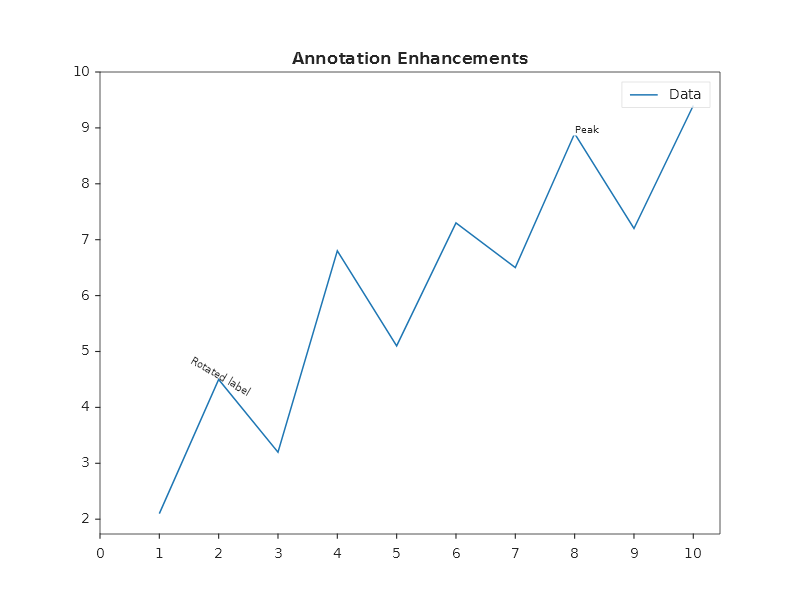
Arrow annotations with background
Plt.Create()
    .AddSubPlot(1, 1, 1, ax => ax
        .WithTitle("Annotation Enhancements")
        .Plot(x, y, line => { line.Label = "Data"; })
        .Annotate("Peak", 8, 8.9, ann =>
        {
            ann.ArrowTargetX = 8;
            ann.ArrowTargetY = 8.9;
            ann.ArrowStyle   = ArrowStyle.FancyArrow;
            ann.BackgroundColor = Colors.White;
        })
        .Annotate("Rotated label", 2, 4.5, ann =>
        {
            ann.Rotation  = -30;
            ann.Alignment = TextAlignment.Center;
        }))
    .Save("annotations.svg");
Horizontal reference line
Mark thresholds, targets, or boundaries:
Plt.Create()
    .AddSubPlot(1, 1, 1, ax => ax
        .Plot(x, y, s => s.Label = "Data")
        .AxHLine(5.0, l =>
        {
            l.Color = Colors.Red;
            l.LineStyle = LineStyle.Dashed;
            l.LineWidth = 1.5;
            l.Label = "Threshold";
        })
        .WithLegend())
    .Save("hline.svg");
Vertical reference line
Plt.Create()
    .AddSubPlot(1, 1, 1, ax => ax
        .Plot(x, y)
        .AxVLine(5.0, l =>
        {
            l.Color = Colors.Green;
            l.LineStyle = LineStyle.DashDot;
            l.Label = "Event";
        })
        .WithLegend())
    .Save("vline.svg");
Shaded span regions
Highlight a range on the axis:
Plt.Create()
    .AddSubPlot(1, 1, 1, ax => ax
        .Plot(x, y, s => s.Label = "Signal")
        // Vertical span: highlight an X range
        .AxVSpan(3.0, 6.0, s =>
        {
            s.Color = Colors.Yellow;
            s.Alpha = 0.3;
            s.Label = "Active period";
        })
        // Horizontal span: highlight a Y range
        .AxHSpan(4.0, 7.0, s =>
        {
            s.Color = Css4Colors.LightBlue;
            s.Alpha = 0.2;
            s.Label = "Target range";
        })
        .WithLegend())
    .Save("spans.svg");
Multiple reference lines
Plt.Create()
    .AddSubPlot(1, 1, 1, ax => ax
        .Plot(x, y, s => s.Label = "Price")
        .AxHLine(20, l => { l.Color = Colors.Green; l.LineStyle = LineStyle.Dashed; l.Label = "Support"; })
        .AxHLine(70, l => { l.Color = Colors.Red;   l.LineStyle = LineStyle.Dashed; l.Label = "Resistance"; })
        .AxVLine(5,  l => { l.Color = Colors.Gray;  l.LineStyle = LineStyle.Dotted; l.Label = "Earnings date"; })
        .WithLegend(LegendPosition.UpperLeft))
    .Save("multi_ref.svg");
A reference line takes part in the automatic range, as matplotlib's axhline and axvline do: a line beyond the
data widens the axis to hold it, exactly as a data point at that value would, so the line is always drawn inside
the plot. The same holds for AddLevel, the levels of AddFibonacci and the line of Threshold. Under a limit you
set (SetYLim, SetXLim, a zoom), a line beyond the limit is not drawn, and neither is its label; a line standing
exactly on a limit is drawn on that edge. A line at a value the axis cannot place (double.NaN, an infinity, 0 or
less on a log axis) is left out.
A shaded span does not widen the range. It is cut at the edge of the plot: an edge beyond what the axis shows runs to the plot edge, and a span wholly beyond it draws nothing.
Threshold convenience
Threshold(...) is a single-call shortcut. It adds a dashed reference line and a
shaded breach-zone span in one step. Use it instead of calling AxHLine and
AxHSpan yourself when you only need to mark a breach boundary.
double[] x = Enumerable.Range(0, 100).Select(i => (double)i).ToArray();
double[] y = x.Select(v => 50 + 30 * Math.Sin(v * 0.15)).ToArray();

// Shade everything ABOVE 70 (overbought zone)
Plt.Create()
    .AddSubPlot(1, 1, 1, ax => ax
        .Plot(x, y, s => s.Label = "Signal")
        .Threshold(70.0, Orientation.Horizontal, ThresholdBreach.Above,
            color: Colors.Red, label: "Overbought")
        .WithLegend())
    .Save("threshold_above.svg");
Shade the below side for a support floor:
Plt.Create()
    .AddSubPlot(1, 1, 1, ax => ax
        .Plot(x, y, s => s.Label = "Signal")
        .Threshold(30.0, Orientation.Horizontal, ThresholdBreach.Below,
            color: Colors.Tab10Green, label: "Oversold")
        .WithLegend())
    .Save("threshold_below.svg");
Stack both to create a corridor with upper and lower bounds:
Plt.Create()
    .AddSubPlot(1, 1, 1, ax => ax
        .Plot(x, y, s => s.Label = "RSI")
        .Threshold(70.0, Orientation.Horizontal, ThresholdBreach.Above, Colors.Red,   "Overbought")
        .Threshold(30.0, Orientation.Horizontal, ThresholdBreach.Below, Colors.Tab10Green, "Oversold")
        .SetYLabel("RSI")
        .WithLegend())
    .Save("threshold_corridor.svg");
Vertical thresholds work the same way. Orientation.Vertical marks a constant X:
// Shade everything to the RIGHT of an event date
DateTime eventDate = new DateTime(2026, 6, 15);

Plt.Create()
    .AddSubPlot(1, 1, 1, ax => ax
        .Plot(dates, prices, s => s.Label = "Price")
        .SetXDateAxis()
        .Threshold(eventDate.ToOADate(), Orientation.Vertical, ThresholdBreach.Above,
            color: Colors.Tab10Orange, label: "Event")
        .WithLegend())
    .Save("threshold_vertical.svg");
Threshold parameters
| Parameter | Type | Default | Description |
|---|---|---|---|
value |
double |
(required) | Threshold position in data coordinates. |
orientation |
Orientation |
(required) | Horizontal draws a constant Y line; Vertical draws a constant X line. |
breach |
ThresholdBreach |
(required) | Above shades above or to the right of the line; Below shades below or to the left. |
color |
Color? |
null |
Colour for both the dashed line and the span fill. null uses the renderer cycle colour. |
label |
string? |
null |
Annotation text placed at the threshold value. null adds no annotation. |
The dashed line is a ReferenceLine with LineStyle.Dashed. You can change it
afterwards through axes.ReferenceLines. The zone runs from the line to the edge of the
plot (double.MaxValue for Above, double.MinValue for Below), cut where the plot ends.
The line takes part in the automatic range, so a threshold above everything the chart
shows is still drawn, with its zone up to the top of the plot. Beyond a limit you set,
neither the line nor the zone is drawn.
Combining annotations with math text
Plt.Create()
    .AddSubPlot(1, 1, 1, ax => ax
        .Plot(x, y)
        .Annotate(@"$R^{2} = 0.97$", 3, 7, ann =>
        {
            ann.BackgroundColor = Colors.White;
            ann.Font = new Font { Size = 14 };
        })
        .Annotate(@"$\frac{\partial f}{\partial x} = 0$", 8, 3, ann =>
        {
            ann.ArrowTargetX = 8;
            ann.ArrowTargetY = y[8];
            ann.ArrowStyle = ArrowStyle.FancyArrow;
        }))
    .Save("math_annotations.svg");
Fluent API reference
| Method | Parameters | Description |
|---|---|---|
.Annotate(text, x, y, cfg?) |
text, position | Text annotation at (x, y) |
.Annotate(text, x, y, arrowX, arrowY, cfg?) |
text, position, arrow target | Text with an arrow pointing to the target |
.AxHLine(y, cfg?) |
y position | Horizontal reference line |
.AxVLine(x, cfg?) |
x position | Vertical reference line |
.AxHSpan(yMin, yMax, cfg?) |
y range | Horizontal shaded band |
.AxVSpan(xMin, xMax, cfg?) |
x range | Vertical shaded band |
.Threshold(value, orientation, breach, color?, label?) |
value, orientation, breach | Dashed reference line and shaded breach span |
Annotation properties
| Property | Type | Description |
|---|---|---|
ArrowTargetX/Y |
double |
Arrow endpoint |
ArrowStyle |
ArrowStyle |
FancyArrow, Simple, ... |
BackgroundColor |
Color |
Text background |
FontSize |
double |
Font size |
Rotation |
double |
Text rotation in degrees |
Alignment |
TextAlignment |
Left, Center, Right |
ReferenceLine properties
| Property | Type | Description |
|---|---|---|
Color |
Color |
Line color |
LineStyle |
LineStyle |
Solid, Dashed, Dotted, DashDot |
LineWidth |
double |
Line width |
Label |
string |
Legend label |
SpanRegion properties
| Property | Type | Description |
|---|---|---|
Color |
Color |
Fill color |
Alpha |
double |
Transparency (0–1) |
Label |
string |
Legend label |