Bar Charts
Install:
dotnet add package MatPlotLibNet
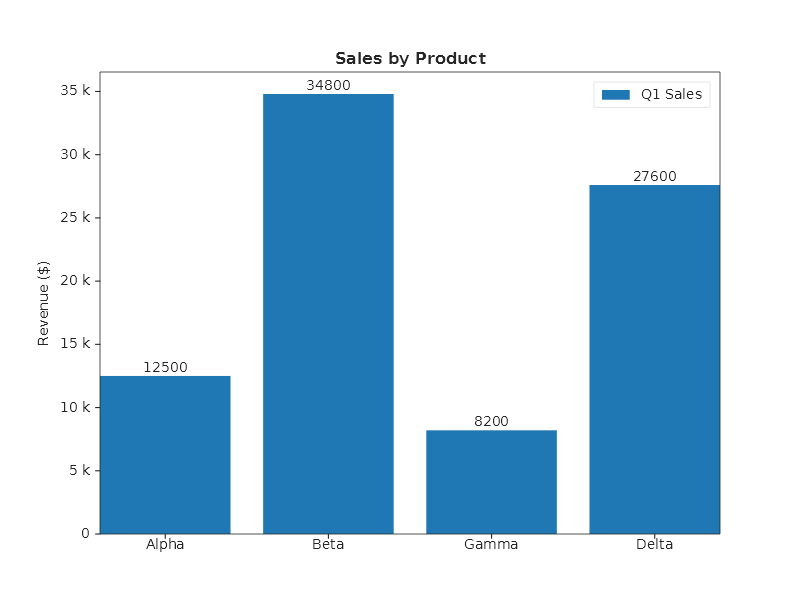
Bar chart with labels
string[] products = ["Alpha", "Beta", "Gamma", "Delta"];
double[] sales    = [12_500, 34_800, 8_200, 27_600];

Plt.Create()
    .AddSubPlot(1, 1, 1, ax => ax
        .WithTitle("Sales by Product")
        .SetYLabel("Revenue ($)")
        .Bar(products, sales, bar => { bar.Color = Colors.Tab10Blue; bar.Label = "Q1 Sales"; })
        .WithBarLabels("F0")
        .SetYTickFormatter(new EngFormatter()))
    .Save("bar_labels.svg");
Horizontal bars
string[] products = ["Alpha", "Beta", "Gamma", "Delta"];
double[] sales    = [12_500, 34_800, 8_200, 27_600];

Plt.Create()
    .AddSubPlot(1, 1, 1, ax => ax
        .Bar(products, sales, s =>
        {
            s.Orientation = BarOrientation.Horizontal;
            s.Color = Colors.Teal;
        })
        .WithBarLabels("F0")
        .SetXMargin(0.1)                                // room past the longest bar for its label
        .SetXLabel("Revenue ($)"))
    .Save("horizontal_bars.svg");
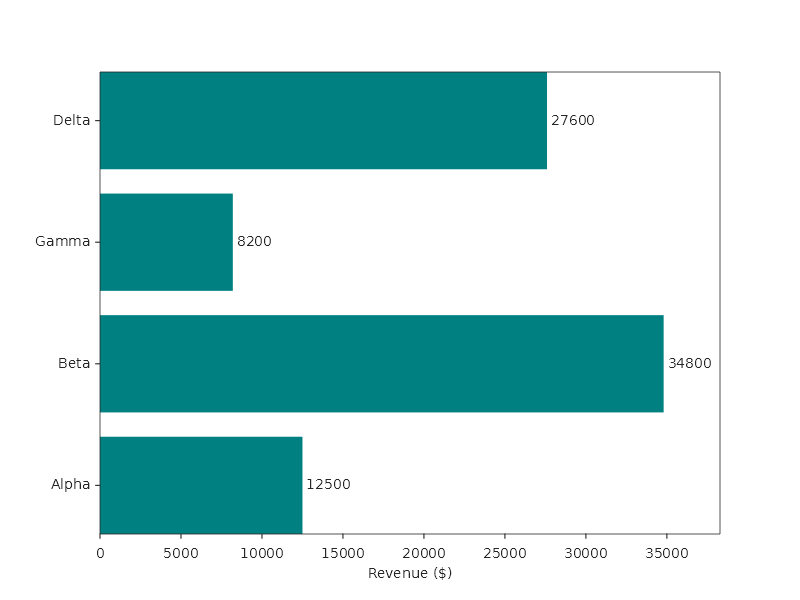
A bar that lies down measures its value along X, every bar from 0, and its category stands along Y, each bar 0.8
of its category's slot thick. The names are the Y axis' tick labels, level with their bars, and the first category
is at the bottom, as matplotlib's barh draws it. To read them from the top down, set the Y limits high to low:
.SetYLim(products.Length, 0) puts the first category at the top, and the names follow their bars. The left margin
widens to hold the longest name and the Y axis title beside it. A value label stays inside the plot, so the longest
bar needs room past its end for its label: without .SetXMargin(0.1) its label is drawn over the end of the bar.
Bars below zero
A negative value hangs down from zero, so gains and losses read on one axis without any setting. The automatic range takes in the most negative bar as it takes in the highest one; a reference line at zero makes the divide easy to see:
string[] months = ["Jan", "Feb", "Mar", "Apr", "May", "Jun"];
double[] change = [4.2, -1.8, 2.5, -3.1, 0.7, 3.4];

Plt.Create()
    .AddSubPlot(1, 1, 1, ax => ax
        .Bar(months, change)
        .AxHLine(0, line => { line.LineStyle = LineStyle.Solid; line.Color = Colors.Black; })
        .SetYLabel("Month-on-month change (%)"))
    .Save("bars_below_zero.svg");
Bars on a log scale
On a log axis zero has no place, so a bar cannot stand on it. Each bar stands on the bottom edge of the plot and reaches up to where the log scale puts its value, as matplotlib clips it. The axis starts a margin below the shortest bar, as matplotlib's does, so every bar shows, here the 42 calls of the cache. A bar whose own value the scale cannot place (0 or below) is left out:
string[] services = ["cache", "api", "db", "batch"];
double[] calls    = [42, 1_800, 23_000, 410_000];

Plt.Create()
    .AddSubPlot(1, 1, 1, ax => ax
        .Bar(services, calls)
        .SetYScale(AxisScale.Log)
        .SetYLabel("Calls per hour"))
    .Save("bars_log_scale.svg");
Stacked bars
Plt.Create()
    .AddSubPlot(1, 1, 1, ax => ax
        .SetBarMode(BarMode.Stacked)
        .Bar(products, q1, s => { s.Color = Colors.Tab10Blue; s.Label = "Q1"; })
        .Bar(products, q2, s => { s.Color = Colors.Orange;    s.Label = "Q2"; })
        .Bar(products, q3, s => { s.Color = Colors.Green;     s.Label = "Q3"; })
        .WithLegend()
        .WithBarLabels())
    .Save("bar_stacked.svg");
Grouped bars
Several bars per category, in one call:
string[] quarters = ["Q1", "Q2", "Q3", "Q4"];

Plt.Create()
    .AddSubPlot(1, 1, 1, ax => ax
        .GroupedBar(quarters,
        [
            new BarGroup("north", [12, 18, 15, 21]),
            new BarGroup("south", [ 9, 14, 17, 16]),
            new BarGroup("east",  [ 7, 11, 13, 19]),
        ])
        .WithLegend(LegendPosition.UpperLeft))
    .Save("bar_grouped.svg");
Each group becomes its own series, labelled with the group's name, and the bars step aside for each other inside every category. One optional configuration action reaches all of them at once; here it lays the groups down:
string[] quarters = ["Q1", "Q2", "Q3", "Q4"];
BarGroup[] regions =
[
    new("north", [12, 18, 15, 21]),
    new("south", [ 9, 14, 17, 16]),
    new("east",  [ 7, 11, 13, 19]),
];

Plt.Create()
    .AddSubPlot(1, 1, 1, ax => ax
        .GroupedBar(quarters, regions, s => s.Orientation = BarOrientation.Horizontal)
        .WithLegend(LegendPosition.LowerRight))
    .Save("grouped_horizontal_bars.svg");
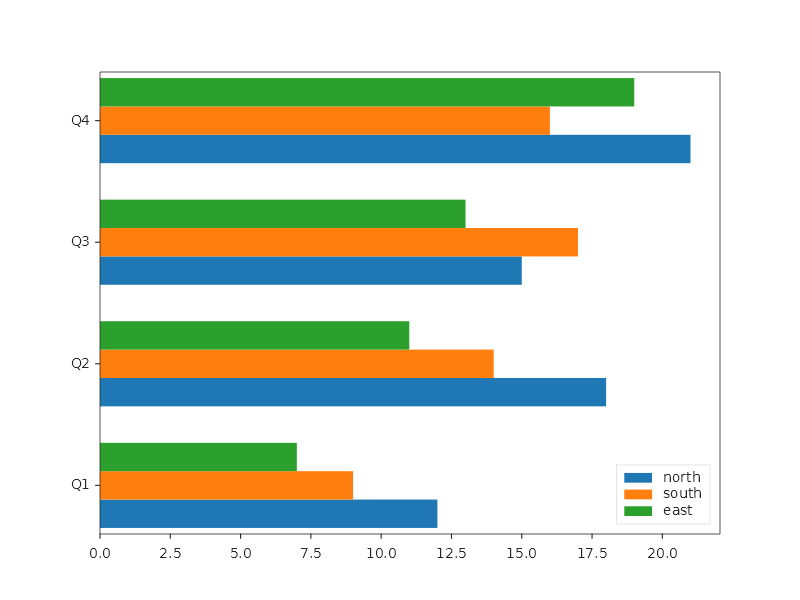
The groups are an ordered list, not a dictionary. That order is the picture: it decides which bar sits where inside every category and which colour each group takes from the theme's cycle. A dictionary has no order to give, so it cannot express that.
Adding the series one at a time still works and is the way to give each one a different colour by hand:
Plt.Create()
    .AddSubPlot(1, 1, 1, ax => ax
        .Bar(products, q1, s => { s.Color = Colors.CornflowerBlue; s.Label = "Q1"; })
        .Bar(products, q2, s => { s.Color = Colors.Salmon;         s.Label = "Q2"; })
        .WithLegend(LegendPosition.UpperLeft))
    .Save("bar_grouped.svg");
Bar width, edge color, and alpha
Plt.Create()
    .AddSubPlot(1, 1, 1, ax => ax
        .Bar(products, sales, s =>
        {
            s.Color = Colors.CornflowerBlue;
            s.EdgeColor = Colors.Navy;
            s.LineWidth = 1.5;
            s.BarWidth = 0.5;   // narrower bars (default 0.8)
            s.Alpha = 0.7;
            s.Align = BarAlignment.Center;
        }))
    .Save("bar_styled.svg");
Hatching patterns
Add texture to bars for print-friendly charts:
Plt.Create()
    .AddSubPlot(1, 1, 1, ax => ax
        .Bar(products, q1, s =>
        {
            s.Color = Css4Colors.LightBlue;
            s.Hatch = HatchPattern.ForwardDiagonal;
            s.HatchColor = Css4Colors.DarkBlue;
            s.Label = "Q1";
        })
        .Bar(products, q2, s =>
        {
            s.Color = Css4Colors.LightCoral;
            s.Hatch = HatchPattern.BackDiagonal;
            s.HatchColor = Css4Colors.DarkRed;
            s.Label = "Q2";
        })
        .WithLegend())
    .Save("bar_hatched.svg");
Bar labels with custom format
Plt.Create()
    .AddSubPlot(1, 1, 1, ax => ax
        .Bar(products, sales, s =>
        {
            s.ShowLabels = true;
            s.LabelFormat = "C0";  // currency format
        }))
    .Save("bar_custom_labels.svg");
Fluent API reference — BarSeries
| Property | Type | Default | Description |
|---|---|---|---|
Color |
Color |
auto | Bar fill color |
EdgeColor |
Color |
auto | Bar outline color |
LineWidth |
double |
0.5 |
Outline width |
BarWidth |
double |
0.8 |
Width as fraction |
Orientation |
BarOrientation |
Vertical |
Vertical or Horizontal |
Align |
BarAlignment |
Center |
Center or Edge |
Alpha |
double |
1.0 |
Transparency (0–1) |
Hatch |
HatchPattern |
None |
Slash, Backslash, Dash, Pipe, CrossHash, ... |
HatchColor |
Color |
auto | Hatch pattern color |
ShowLabels |
bool |
false |
Display value labels |
LabelFormat |
string |
none | .NET format string for labels; without one a value shows up to six significant digits, as matplotlib's %g (12500 reads 12500) |
Label |
string |
none | Legend label |
| Axes method | Description |
|---|---|
.SetBarMode(BarMode.Stacked) |
Stack multiple bar series |
.SetBarMode(BarMode.Grouped) |
Side-by-side grouped bars |
.WithBarLabels(format?) |
Show value labels on the bar series added last |
Charts in one call
The charts below are each one call on the axes. A call takes the data the way you hold it (names, groups of values) and adds series the library already draws: bars, lines, scatters, stems and areas. So a chart drawn this way saves, exports and travels like any other chart. Written to JSON it is those series, not the call, and read back it draws the same picture without sorting or estimating again; to change the data, call the verb again.
Where a chart is made of more than one kind of series, the last argument hands you its parts (ParetoParts,
DumbbellParts) after the verb has styled them, so what you set there wins. Where it is made of one series per
group, the last argument is run once for each of them.
Pareto chart
string[] defects = ["Scratches", "Dents", "Cracks", "Stains", "Breaks", "Missing", "Warp"];
double[] counts  = [142, 98, 67, 45, 31, 18, 9];

Plt.Create()
    .WithTitle("Pareto Chart — Defect Analysis")
    .WithSize(900, 500)
    .AddSubPlot(1, 1, 1, ax => ax
        .Pareto(defects, counts, parts => parts.Bars.Label = "Defect count"))
    .Save("pareto_chart.svg");
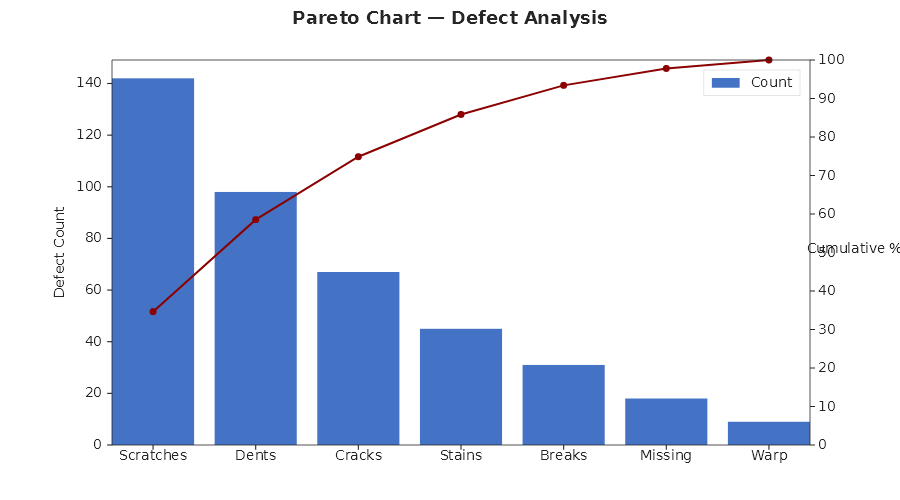
Pareto does what the chart needs and is easy to get wrong by hand:
- It sorts. The categories may come in any order; the bars are drawn largest first. Equal counts keep the order you gave them in, so a tie never reshuffles between runs.
- It accumulates exactly. The line's point on a bar is the share of the total held by that bar and every bar left of it. The total is the last running sum, so the last point is exactly 100.
- It puts the points on the bars. Each point stands on the centre of its bar.
- Both Y axes are one scale. The left axis runs from 0 to 1.05 times the total, the right one from 0 to 105 %, so the top of the first bar is the first point of the line and a count on the left reads its share on the right. These two limits are the only ones the verb sets; a limit you set after the call replaces it. Zoom and pan in the browser change the main axes only, so the right axis keeps its 0 to 105 %.
- Each axis says what it measures. The bars are blue and the line orange, each Y axis wears its series' colour
and is titled with its series' name: "Count" and "Cumulative %" unless you rename a part, as the sample does with
parts.Bars.Label. The legend stands right of centre, between the short bars of the tail and the line.
A missing count (double.NaN) cannot be ranked: its category goes last and keeps its name, with no bar and no
point, and it adds nothing to the total. A negative or infinite count, or counts that add up to 0, are refused
with an ArgumentException that names the category.
Lollipop chart
string[] products = ["Alpha", "Beta", "Gamma", "Delta", "Epsilon", "Zeta"];
double[] scores   = [82.5, 67.3, 91.1, 54.8, 76.4, 88.2];

Plt.Create()
    .WithTitle("Lollipop Chart — Product Scores")
    .WithSize(800, 450)
    .AddSubPlot(1, 1, 1, ax => ax
        .Lollipop(products, scores, s =>
        {
            s.StemColor = Color.FromHex("#5B9BD5");
            s.MarkerColor = Color.FromHex("#5B9BD5");
        })
        .SetYLabel("Score"))
    .Save("lollipop_chart.svg");
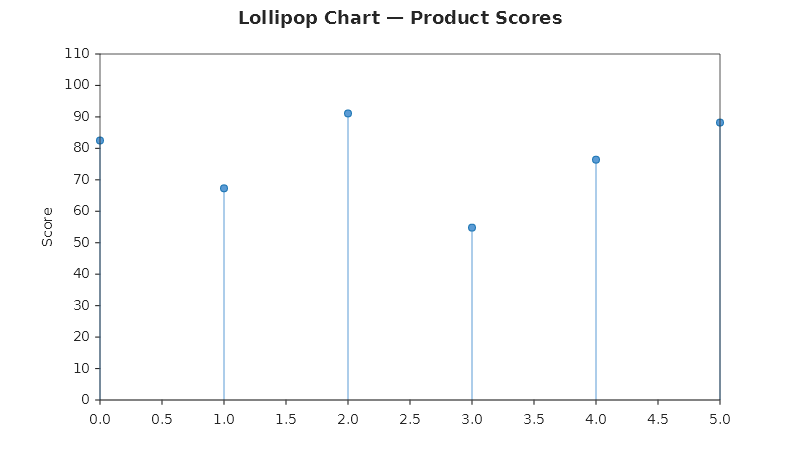
A lollipop chart is one stem series: each stem stands on the centre of its category, on the baseline at 0, and ends in its head. So the chart wears one colour, has one legend entry, and a click on that entry hides all of it. The categories are named on the X axis. The verb sets no limits: the automatic range leaves the first and the last head their margin, so every head is a whole circle, and a limit you set yourself stays yours. A missing value draws no stem and no head.
Dumbbell chart
Two moments per category, where it was and where it is, joined by a connector:
string[] products = ["Product A", "Product B", "Product C", "Product D", "Product E", "Product F"];

Plt.Create()
    .WithTitle("Dumbbell Chart — Before vs After")
    .WithSize(800, 450)
    .AddSubPlot(1, 1, 1, ax => ax
        .Dumbbell(products,
            new BarGroup("Before", [62.0, 78.5, 55.0, 83.0, 70.0, 48.0]),
            new BarGroup("After",  [74.0, 82.0, 68.0, 79.5, 88.5, 61.0]))
        .SetYLabel("Score")
        .WithLegend())
    .Save("dumbbell_chart.svg");
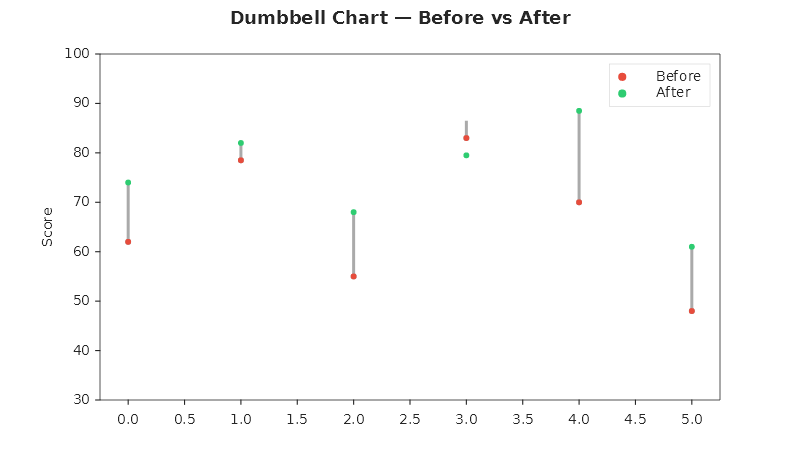
The dots are two scatter series named after the groups, in the theme's first two colours. The connector runs from the lower of a category's two values to the higher one, whichever group is higher, so a category that went down (Product D, 83.0 to 79.5) is joined like one that went up. It is drawn behind the dots in the library's neutral grey and has no legend entry: a click on "Before" hides the before dots and leaves the connectors in place. A missing value leaves that category's connector out, and its dot. The verb sets no limits.
The last argument receives the three series, so they can be restyled:
ax.Dumbbell(products, before, after, parts =>
{
    parts.From.Color = Color.FromHex("#E74C3C");
    parts.To.Color = Color.FromHex("#2ECC71");
    parts.Connector.LineWidth = 4;
});
Slope graph
How each category changed between two moments, with the direction and the steepness of every change at a glance:
string[] regions = ["North", "South", "East", "West"];

Plt.Create()
    .WithTitle("Sales by region")
    .WithSize(700, 500)
    .AddSubPlot(1, 1, 1, ax => ax
        .SlopeGraph(regions,
            new BarGroup("2015", [42.0, 55.0, 38.0, 61.0]),
            new BarGroup("2025", [51.0, 49.0, 44.0, 66.0]))
        .SetYLabel("Sales"))
    .Save("slope_graph.svg");
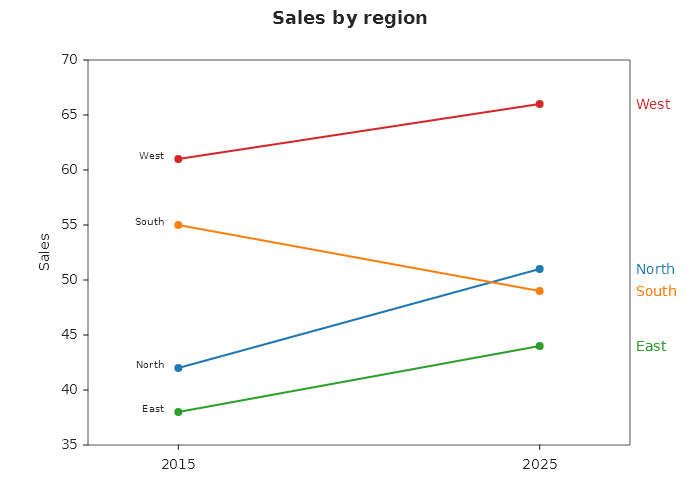
Each category is one line with a marker at each end, in one colour of the theme's cycle. The two moments are named
on the X axis by the groups' names. A category's name stands at both ends: right of the end point in the line's
colour, and left of the start point in the theme's text colour, so the chart draws no legend. The verb widens the X
margin to a quarter of the distance between the two moments, so the start names stand clear of the Y axis' tick
labels; a longer name needs more room, .SetXMargin(0.35) after the call. A missing value leaves that point and its
name out; the other end is still drawn, as a marker of its own.
Dot plot
A Cleveland dot plot: the categories down the Y axis, one dot per group on each row, so values compare along one scale and groups compare within a row:
string[] languages = ["Ruby", "Go", "Rust", "Java", "Python"];

Plt.Create()
    .WithTitle("Programming languages")
    .AddSubPlot(1, 1, 1, ax => ax
        .DotPlot(languages,
        [
            new BarGroup("2015", [31.0, 48.0, 62.0, 55.0, 80.0]),
            new BarGroup("2025", [35.0, 52.0, 60.0, 58.0, 84.0]),
        ])
        .SetXLabel("Share of developers (%)"))
    .Save("dot_plot.svg");
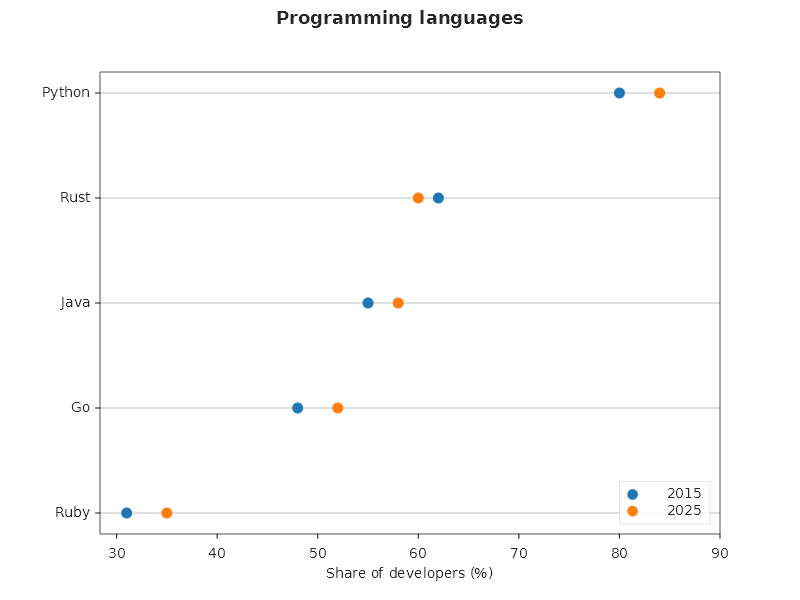
The rows are sorted by the first group, largest on top; equal values keep the order you gave them in, and a category
whose first value is missing goes to the bottom. Each group is one scatter series named in the legend. The guide
lines from a name to its dots are the grid along the Y axis, so they follow the theme and WithGrid after the call
restyles them. The legend stands in the lower right corner, the corner a sorted chart leaves empty; WithLegend(...)
after the call moves it. A missing value leaves that dot out and nothing else.
Parallel coordinates
One vertical axis per dimension and one line per row, so rows that behave alike run together:
string[] measures = ["Sepal length", "Sepal width", "Petal length", "Petal width"];

Plt.Create()
    .WithTitle("Three species of iris")
    .WithSize(900, 500)
    .TightLayout()
    .AddSubPlot(1, 1, 1, ax => ax
        .ParallelCoordinates(measures,
        [
            new BarGroup("setosa",     [5.1, 3.5, 1.4, 0.2]),
            new BarGroup("setosa",     [4.9, 3.0, 1.4, 0.2]),
            new BarGroup("setosa",     [4.7, 3.2, 1.3, 0.2]),
            new BarGroup("setosa",     [5.0, 3.6, 1.4, 0.2]),
            new BarGroup("versicolor", [7.0, 3.2, 4.7, 1.4]),
            new BarGroup("versicolor", [6.4, 3.2, 4.5, 1.5]),
            new BarGroup("versicolor", [6.9, 3.1, 4.9, 1.5]),
            new BarGroup("versicolor", [5.5, 2.3, 4.0, 1.3]),
            new BarGroup("virginica",  [6.3, 3.3, 6.0, 2.5]),
            new BarGroup("virginica",  [5.8, 2.7, 5.1, 1.9]),
            new BarGroup("virginica",  [7.1, 3.0, 5.9, 2.1]),
            new BarGroup("virginica",  [6.5, 3.0, 5.8, 2.2]),
        ])
        .WithLegend(LegendPosition.OutsideRight))
    .Save("parallel_coordinates.svg");
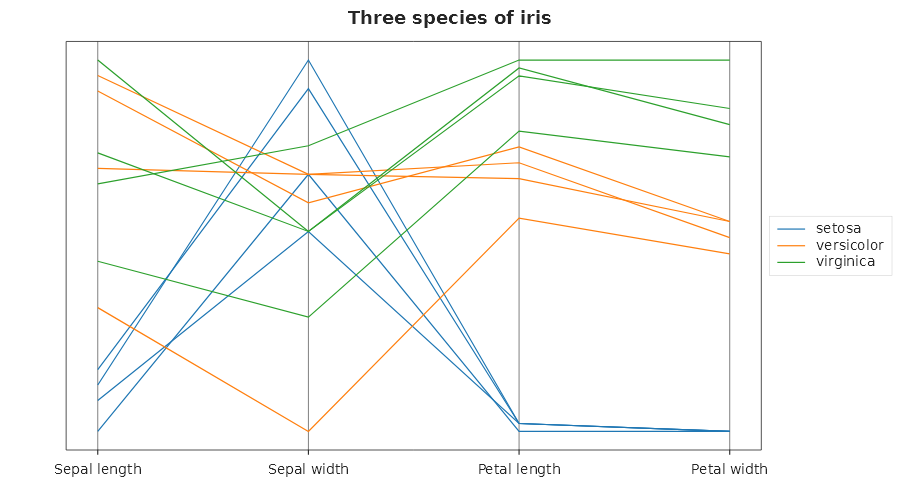
Rows that share a name are one class: one line series in one colour, named once in the legend, so a click on the
entry hides every row of the class. Each column is scaled to 0..1 by its own smallest and largest value over all
the rows, so dimensions in different units share one picture; that is why the Y axis has no ticks, since a number
on it would read none of the columns. A column whose values are all equal is drawn at the middle. Each dimension's
axis is a vertical line at its name, in the grey of a reference line. The lines fill the plot, so the legend
covers some of them wherever it stands inside; WithLegend(LegendPosition.OutsideRight) under TightLayout() puts
it beside the plot, as above. A missing value leaves a gap in its own row and nothing else.
Marimekko chart
Columns as wide as their share of the whole, each divided into its segments' shares, so the area of every cell is its share of the total:
string[] channels = ["Retail", "Online", "Wholesale"];

Plt.Create()
    .WithTitle("Market by channel and brand")
    .WithSize(800, 500)
    .TightLayout()
    .AddSubPlot(1, 1, 1, ax => ax
        .Marimekko(channels,
        [
            new BarGroup("Brand A", [30, 15, 5]),
            new BarGroup("Brand B", [20, 25, 10]),
            new BarGroup("Brand C", [10, 20, 15]),
        ])
        .SetXLabel("Channel (width: its share of the market)")
        .WithLegend(LegendPosition.OutsideRight))
    .Save("marimekko.svg");
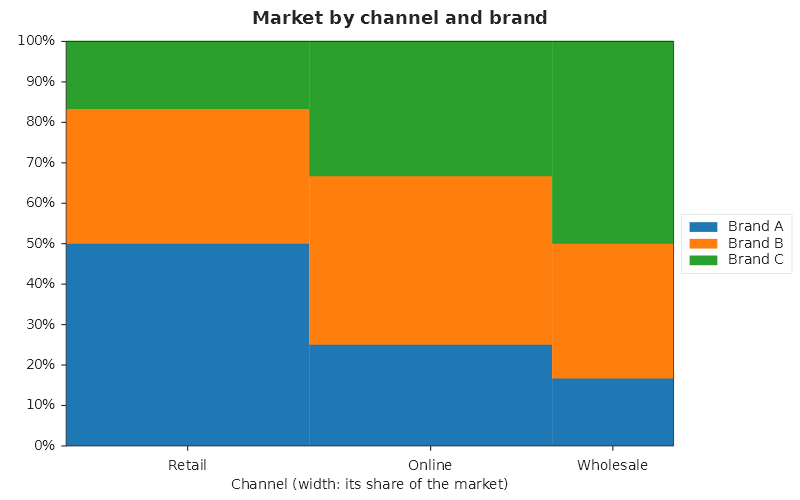
A column's width is its share of the grand total and a cell's height its share of the column, from the first segment at the bottom. The X axis runs from 0 to 100 % of the total and names each column under its centre; the Y axis reads in percent of the column. Each segment is one opaque area series in one colour, named in the legend. A missing size is an empty cell that adds nothing to its column, a size of 0 draws nothing, and a column with nothing in it is 0 wide and unnamed. Two neighbouring cells of one segment with the same share meet without a line between them.
To name ticks that do not stand one per slot, as the columns here do not, pair a FixedLocator with
new CategoryFormatter(labels, positions): a tick at positions[k] reads labels[k].
Monthly P&L waterfall
string[] months = ["Jan", "Feb", "Mar", "Apr", "May", "Jun", "Jul", "Aug", "Sep", "Oct", "Nov", "Dec", "Total"];
double[] pnl = [120, -45, 80, -30, 95, 60, -20, 110, -55, 75, 40, 130, 0];
pnl[12] = pnl[..12].Sum();

Plt.Create()
    .WithTitle("Monthly P&L Waterfall")
    .WithSize(1100, 500)
    .AddSubPlot(1, 1, 1, ax => ax
        .Waterfall(months, pnl, s =>
        {
            s.IncreaseColor = Color.FromHex("#2ECC71");
            s.DecreaseColor = Color.FromHex("#E74C3C");
            s.TotalColor = Color.FromHex("#3498DB");
            s.TotalIndices = [12];   // the last bar is a total: it stands on zero and wears the total colour
            s.BarWidth = 0.6;
        })
        .SetYLabel("P&L (€k)")
        .WithXTickLabelRotation(30))
    .Save("waterfall_pnl.svg");
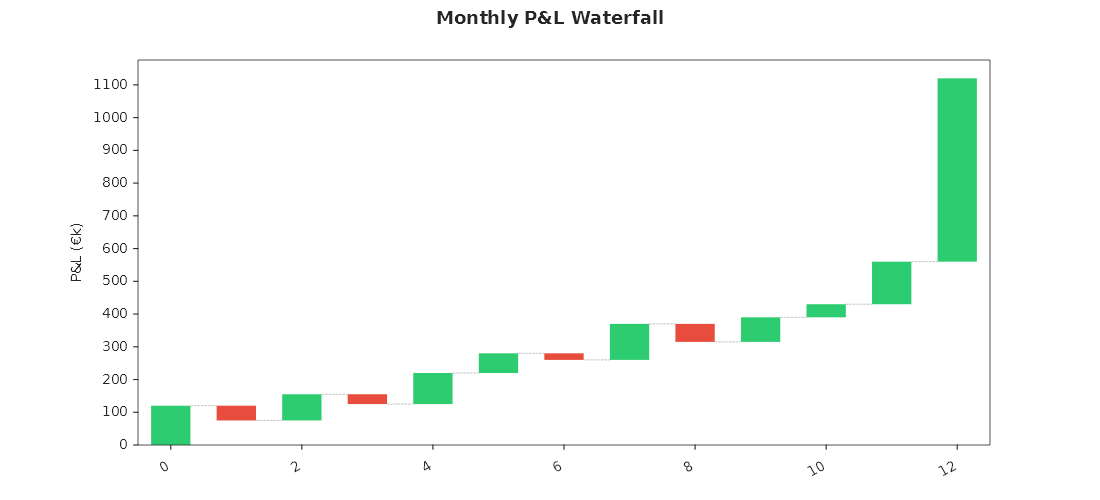
Each step starts where the one before it ended, green when it rises and red when it falls. A bar named in
TotalIndices is a total: a level, not a change, so it stands on zero, reaches the value it holds and wears
TotalColor, and the next step starts from that level. An opening and a closing total are both fine. The steps
are named on the X axis under their bars, and the names follow the X tick settings (here turned 30 degrees). Step
i stands at x = i + 0.5, the centre of its slot, as a bar does, so a limit, a reference line or an annotation at
"step 3" uses 3.5. A missing step is left out with every step after it, until the next total, which states its own
level.