Contour Plots
Install:
dotnet add package MatPlotLibNet
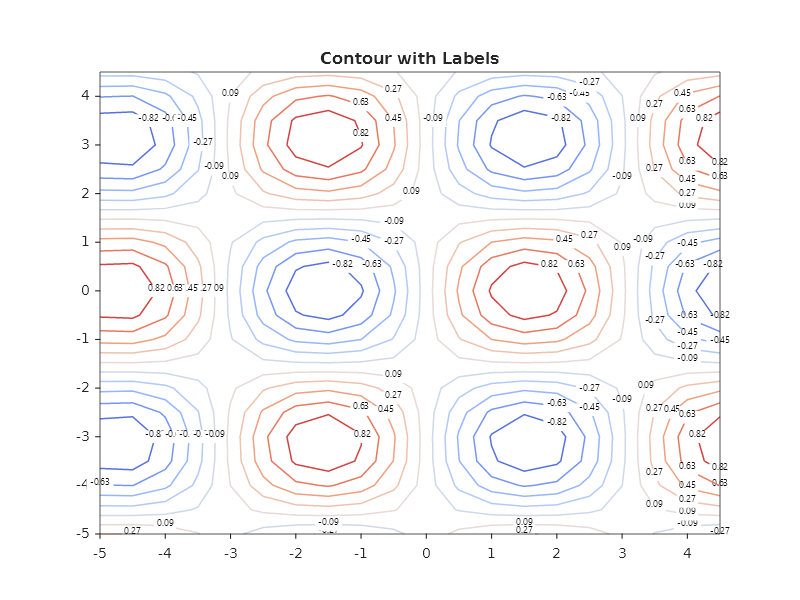
Contour lines with labels
double[] x = Enumerable.Range(0, 20).Select(i => i * 0.5 - 5.0).ToArray();
double[] y = Enumerable.Range(0, 20).Select(i => i * 0.5 - 5.0).ToArray();
var z = new double[20, 20];
for (int r = 0; r < 20; r++)
    for (int c = 0; c < 20; c++)
        z[r, c] = Math.Sin(x[c]) * Math.Cos(y[r]);

Plt.Create()
    .AddSubPlot(1, 1, 1, ax => ax
        .WithTitle("Contour with Labels")
        .Contour(x, y, z, s =>
        {
            s.ShowLabels = true;
            s.LabelFormat = "F2";
            s.LabelFontSize = 9;
        })
        .WithColorMap("coolwarm"))
    .Save("contour_labels.svg");
A colour map name is checked.
AxesBuilder.WithColorMap(string)throwsArgumentExceptionwhen the name is unknown, for example the typo"virdis", and the exception lists the registered names, so a typo never falls back to a default map in silence. If you want a lookup that does not throw, fetch the instance yourself withColorMapRegistry.Get(name)and call theWithColorMap(IColorMap)overload only when the result is not null.
Filled contour (contourf)
Plt.Create()
    .AddSubPlot(1, 1, 1, ax => ax
        .WithTitle("Filled Contour")
        .Contourf(x, y, z, s =>
        {
            s.Levels = 15;
            s.ColorMap = ColorMaps.Viridis;
        })
        .WithColorBar(cb => cb with { Label = "Amplitude" }))
    .Save("contourf.svg");
Custom contour levels
Plt.Create()
    .AddSubPlot(1, 1, 1, ax => ax
        .Contour(x, y, z, s =>
        {
            // Explicit level values instead of auto count
            s.LevelValues = [-0.8, -0.4, 0, 0.4, 0.8];
            s.ShowLabels = true;
            s.LabelFormat = "F1";
        })
        .WithColorMap("RdBu"))
    .Save("contour_custom_levels.svg");
The levels you name are the levels drawn, ascending and each once; Levels is ignored while LevelValues holds a
value. A level outside the range of the grid crosses no cell, so it draws no line, and a level that is not a number
is left out. A filled contour (Contourf) takes LevelValues too: it fills one band between each pair of
neighbouring levels and runs its colour map and colour bar from the first level to the last, whatever range the
grid spans. Its lowest band is painted under the whole plot, so where the grid lies below the first level you name,
the plot shows that band's colour; matplotlib leaves that area empty unless asked to extend the colours.
Contour with level count
Plt.Create()
    .AddSubPlot(1, 1, 1, ax => ax
        .Contour(x, y, z, s =>
        {
            s.Levels = 20;           // 20 contour lines
            s.ShowLabels = false;    // no inline labels
        })
        .WithColorMap("plasma")
        .WithColorBar())
    .Save("contour_dense.svg");
Contour + filled contour overlay
Plt.Create()
    .AddSubPlot(1, 1, 1, ax => ax
        .WithTitle("Filled + Line Contour")
        .Contourf(x, y, z, s => { s.Levels = 12; s.ColorMap = ColorMaps.Coolwarm; })
        .Contour(x, y, z, s =>
        {
            s.Levels = 12;
            s.ShowLabels = true;
            s.LabelFormat = "F2";
        })
        .WithColorBar())
    .Save("contour_overlay.svg");
Triangulated contour
Use a triangulated contour for irregularly spaced data. The points are connected by Delaunay triangulation:
Plt.Create()
    .AddSubPlot(1, 1, 1, ax => ax
        .Tricontour(xIrregular, yIrregular, zIrregular)
        .WithColorMap("viridis")
        .WithColorBar())
    .Save("tricontour.svg");
Fluent API reference — ContourSeries
| Property | Type | Default | Description |
|---|---|---|---|
Levels |
int |
10 |
Number of contour levels |
LevelValues |
double[] |
none | The levels to draw, ascending, each once; Levels is ignored when set |
Filled |
bool |
false |
Filled areas (contourf) instead of lines only |
ShowLabels |
bool |
false |
Show level values on contour lines |
LabelFormat |
string |
"G4" |
.NET format string for labels |
LabelFontSize |
double |
10 |
Label font size |
ColorMap |
IColorMap |
auto | Colormap for level colors |