Distribution Charts
Install:
dotnet add package MatPlotLibNet
Histogram
var rng = new Random(42);
double[] data = Enumerable.Range(0, 1000)
    .Select(_ => rng.NextDouble() * 6 + rng.NextDouble() * 6)
    .ToArray();

Plt.Create()
    .AddSubPlot(1, 1, 1, ax => ax
        .Hist(data, 30, s => { s.Color = Colors.Teal; s.Label = "Distribution"; })
        .WithLegend())
    .Save("histogram.svg");
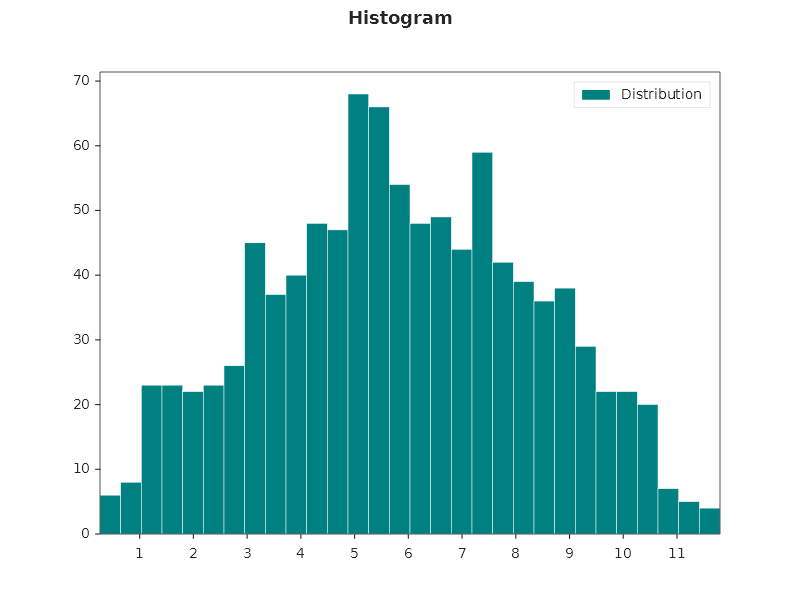
Histogram with density normalization
Plt.Create()
    .AddSubPlot(1, 1, 1, ax => ax
        .Hist(data, 30, s =>
        {
            s.Color = Colors.CornflowerBlue;
            s.Density = true;        // normalize to probability density
            s.EdgeColor = Colors.White;
            s.Alpha = 0.7;
            s.Label = "Density";
        })
        .SetYLabel("Probability density")
        .WithLegend())
    .Save("hist_density.svg");
Cumulative histogram
Plt.Create()
    .AddSubPlot(1, 1, 1, ax => ax
        .Hist(data, 50, s =>
        {
            s.Cumulative = true;
            s.Color = Colors.Salmon;
            s.HistType = HistType.Step;   // step outline (no fill)
            s.Label = "Cumulative";
        })
        .WithLegend())
    .Save("hist_cumulative.svg");
Histogram with hatching
Set Hatch and HatchColor for a print-friendly histogram:
Plt.Create()
    .AddSubPlot(1, 1, 1, ax => ax
        .Hist(data, 20, s =>
        {
            s.Color = Css4Colors.LightBlue;
            s.Hatch = HatchPattern.ForwardDiagonal;
            s.HatchColor = Css4Colors.DarkBlue;
            s.EdgeColor = Css4Colors.DarkBlue;
            s.RWidth = 0.9;   // bar width as fraction of bin width
        }))
    .Save("hist_hatched.svg");
Overlapping histograms
var rng = new Random(42);
// Box-Muller: a normally distributed sample built from two uniform ones.
double Gaussian(double mean, double sd) =>
    mean + sd * Math.Sqrt(-2 * Math.Log(rng.NextDouble())) * Math.Cos(2 * Math.PI * rng.NextDouble());
double[] group1 = Enumerable.Range(0, 500).Select(_ => Gaussian(5, 1.5)).ToArray();
double[] group2 = Enumerable.Range(0, 500).Select(_ => Gaussian(7, 2.0)).ToArray();

Plt.Create()
    .AddSubPlot(1, 1, 1, ax => ax
        .Hist(group1, 30, s => { s.Color = Colors.Blue; s.Alpha = 0.5; s.Label = "Group A"; })
        .Hist(group2, 30, s => { s.Color = Colors.Red;  s.Alpha = 0.5; s.Label = "Group B"; })
        .WithLegend())
    .Save("hist_overlap.svg");
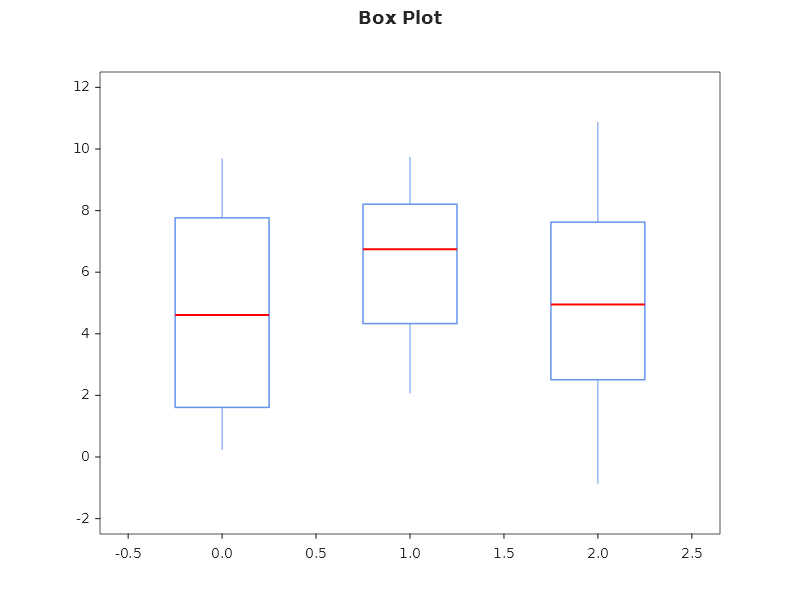
Box plot
double[][] groups = [
    Enumerable.Range(0, 50).Select(_ => rng.NextDouble() * 10).ToArray(),
    Enumerable.Range(0, 50).Select(_ => rng.NextDouble() * 8 + 2).ToArray(),
    Enumerable.Range(0, 50).Select(_ => rng.NextDouble() * 12 - 1).ToArray(),
];

Plt.Create()
    .AddSubPlot(1, 1, 1, ax => ax
        .BoxPlot(groups, s =>
        {
            s.Color = Colors.CornflowerBlue;
            s.MedianColor = Colors.Navy;
            s.ShowMeans = true;
        }))
    .Save("boxplot.svg");
Violin plot
Plt.Create()
    .AddSubPlot(1, 1, 1, ax => ax
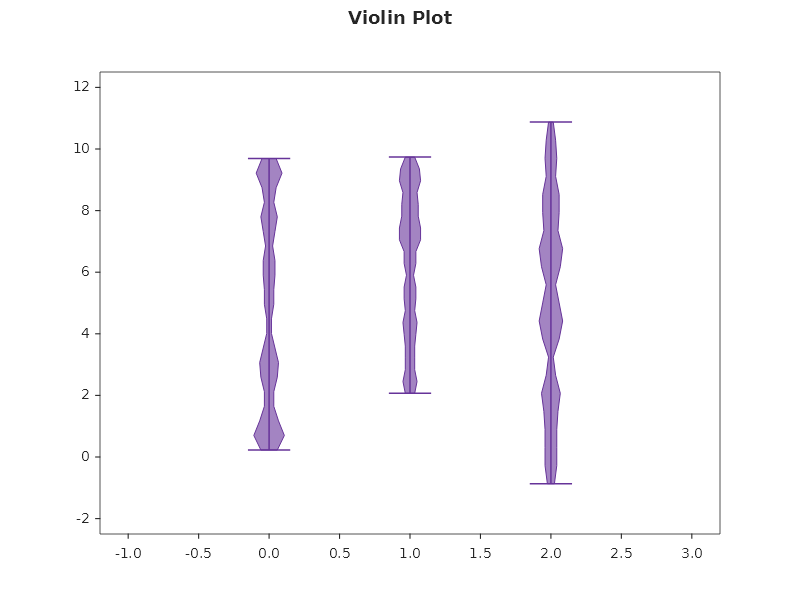
        .Violin(groups, s =>
        {
            s.Color = Css4Colors.MediumPurple;
            s.Alpha = 0.6;
            s.ShowMedians = true;
        }))
    .Save("violin.svg");
Placing violins and boxes
Positions puts each violin or box at an x of your choice, and the X axis follows them: its automatic range covers
what is drawn around each position. Widths sets how wide they are, and a half violin (Side = ViolinSide.High or Low) makes no room on the side it does not draw:
Plt.Create()
    .AddSubPlot(1, 1, 1, ax => ax
        .Violin(groups, s =>
        {
            s.Positions = [10, 20, 30];
            s.Widths = 6;
            s.Side = ViolinSide.High;
        })
        .BoxPlot(groups, s =>
        {
            s.Positions = [10, 20, 30];
            s.Widths = 1.5;
        }))
    .Save("violin_positions.svg");
Under a theme that gives violins colours of their own (Theme.MatplotlibClassic: a yellow body and red lines), a
violin that names a Color wears that colour, body and lines alike, and its legend entry shows the colour the body
wears.
KDE (Kernel Density Estimation)
Plt.Create()
    .AddSubPlot(1, 1, 1, ax => ax
        .Kde(data, s => { s.Label = "Density"; s.Color = Css4Colors.Purple; s.LineWidth = 2.0; })
        .WithLegend())
    .Save("kde.svg");
Combined: Histogram + KDE + Rug
Plt.Create()
    .AddSubPlot(1, 1, 1, ax => ax
        .Hist(data, 30, s => { s.Color = Css4Colors.LightBlue; s.Alpha = 0.5; s.Density = true; })
        .Kde(data, s => { s.Color = Css4Colors.DarkBlue; s.LineWidth = 2; s.Label = "KDE"; })
        .Rugplot(data, s => { s.Color = Css4Colors.DarkBlue; s.Alpha = 0.3; })
        .SetYLabel("Density")
        .WithLegend())
    .Save("hist_kde_rug.svg");
Density scatter — where the points pile up
A scatter of ten thousand points is a black blob. The markers overlap, and where they overlap most is the one
thing a reader wants to know and cannot see. DensityScatter gives each marker its colour from how many points
share its neighbourhood:
Plt.Create()
    .AddSubPlot(1, 1, 1, ax => ax
        .DensityScatter(x, y)
        .SetXLabel("latency (ms)")
        .SetYLabel("payload (kB)")
        .WithColorBar(cb => cb with { Label = "points" }))
    .Save("density_scatter.svg");
The crowding is counted, not estimated with a kernel. A two-dimensional kernel estimate walks every other point for every point, so it costs the square of the sample size — and this chart is only worth drawing when there are enough points that the markers overlap, which is exactly where that cost becomes unpayable. Instead a grid is laid over the cloud and each point takes the count of its own cell.
The grid sizes itself to the point count, aiming at roughly ten points per cell. Pass bins to choose:
ax.DensityScatter(x, y, bins: 40);
Your own configuration runs afterwards, so a better number than crowding can take the colour instead, and the marker colouring stays:
ax.DensityScatter(x, y, s => { s.C = error; s.ColorMap = DivergingColorMaps.RdBu; });
Fluent API reference — HistogramSeries
| Property | Type | Default | Description |
|---|---|---|---|
Color |
Color |
auto | Bar color |
EdgeColor |
Color |
auto | Bar edge color |
Bins |
int |
10 |
Number of bins |
Density |
bool |
false |
Normalize to probability density |
Cumulative |
bool |
false |
Cumulative histogram |
HistType |
HistType |
Bar |
Bar, Step, StepFilled |
Weights |
double[] |
none | Per-value weights |
RWidth |
double |
1.0 |
Bar width as fraction of bin width |
Alpha |
double |
1.0 |
Transparency (0–1) |
Hatch |
HatchPattern |
None |
Texture pattern |
HatchColor |
Color |
auto | Hatch pattern color |
Ridgeline (joyplot)
A ridgeline shows the distribution of several groups as ridges, one above the other, so many distributions compare
at a glance. Each group is a NamedSample: a name and its observations, of any length.
var rng = new Random(42);
// Box-Muller: a normally distributed sample built from two uniform ones.
double Gaussian(double mean, double sd) =>
    mean + sd * Math.Sqrt(-2 * Math.Log(1 - rng.NextDouble())) * Math.Cos(2 * Math.PI * rng.NextDouble());

string[] names = ["Group A", "Group B", "Group C", "Group D", "Group E", "Group F"];
double[] means = [-1.2, -0.4, 0.2, 0.7, 1.3, 1.9];
NamedSample[] groups = [.. names.Select((name, g) =>
    new NamedSample(name, [.. Enumerable.Range(0, 200).Select(_ => Gaussian(means[g], 0.6))]))];

Plt.Create()
    .WithTitle("Ridgeline")
    .WithSize(900, 600)
    .AddSubPlot(1, 1, 1, ax => ax
        .Ridgeline(groups, configure: ridge => ridge.Alpha = 0.7)
        .SetXLabel("Value"))
    .Save("ridge_plot.svg");
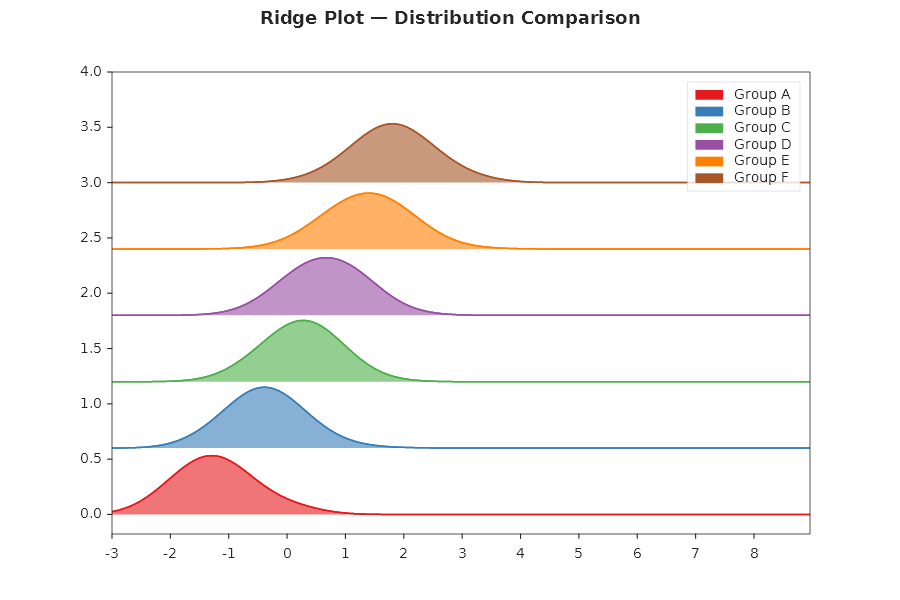
Ridgeline estimates the density of every group and lays the ridges out; what used to take a hand-written kernel
estimate, offsets and a baseline per ridge is one call:
- One way of estimating, so the ridges compare. Every ridge stands on one shared grid of 200 points and is
estimated with one bandwidth: the
bandwidthyou pass, or else the mean of the groups' own Silverman bandwidths (the rule ggridges uses). The distance between the groups is not counted as spread, so groups far apart are not smoothed into each other. The price: a group narrower than the others is drawn as wide as the shared bandwidth. Passbandwidthto choose the smoothing yourself. - One height scale. The tallest ridge reaches exactly the next baseline and every other ridge keeps its height relative to it, so no ridge runs into the one above, whatever the units of the data.
- Names on the axis. The first group is at the top, and the group names are the Y axis' tick labels, one on each baseline. The lower ridges are drawn in front.
Each ridge is one area series in one colour of the theme's cycle; the last argument runs once per ridge, top
first. A ridge has no legend entry, since its name is on the axis. A missing observation (double.NaN) is left out
of the estimate; a group with fewer than two observations is refused. The estimate costs groups × 200 × observations
evaluations: six groups of 1,000 observations take about 6 ms, six of 20,000 about 170 ms.
Q-Q plot
A Q-Q plot (a normal probability plot) shows how a sample differs from a normal one: the sorted sample up the Y axis against the normal quantiles at the same ranks along the X axis, with a reference line.
double[] returns = [0.8, -1.2, 0.3, 2.1, -0.4, 0.9, -2.6, 0.1, 1.4, -0.7, 0.5, -0.2,
                    1.1, -0.9, 0.6, -3.4, 0.2, 1.7, -0.5, 0.4];

Plt.Create()
    .WithTitle("Daily returns against the normal distribution")
    .WithSize(700, 500)
    .AddSubPlot(1, 1, 1, ax => ax
        .QQPlot(returns, parts => parts.Points.Alpha = 0.8)
        .SetYLabel("Daily return (%)"))
    .Save("qq_plot.svg");
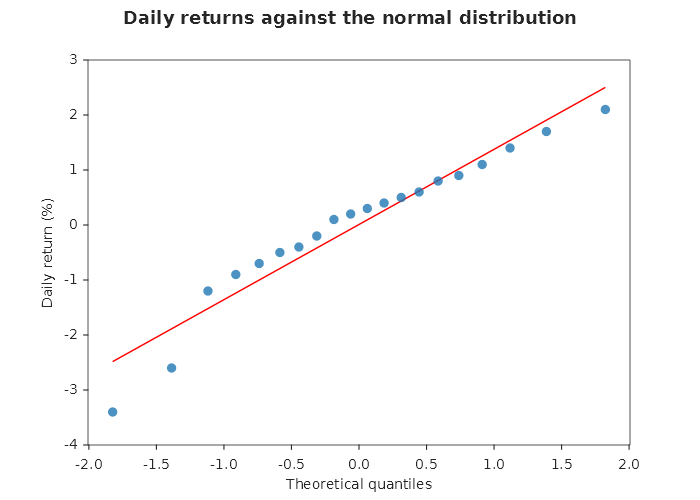
Points on the line mean a normal sample; an S shape means tails lighter or heavier than normal; a bow means the
sample is skewed. The conventions are scipy's probplot: Filliben's plotting positions, and a least-squares line
through the points, whose slope estimates the standard deviation and whose height at 0 the mean. R's qqnorm
and qqline use other plotting positions and a line through the quartiles, so their picture differs slightly.
The points are one scatter series in the theme's first colour; the reference line is solid red, as probplot draws
it, takes no colour from the theme's cycle and has no legend entry. The line is cut at the edge of the plot: for a
skewed sample it runs out through the frame, where scipy widens the axes to hold all of it. QQPlotParts hands
you both: parts.Reference.IsExtended = true draws the line across the whole plot, as R does. The verb titles
the axes "Theoretical quantiles" and "Sample quantiles"; a title you set after the call replaces it. A missing
observation is left out; fewer than two observations are refused. Only the normal distribution is compared.
Kaplan-Meier curve
A survival curve: for each group the estimated probability of not yet having had the event, stepping down at every
event. Each group is a SurvivalGroup: its name, how long each subject was followed, and whether the event was
seen then (true) or the subject was censored then (false: lost to follow-up, or still without the event when
the study ended).
SurvivalGroup[] arms =
[
    new("Treatment", [6, 7, 10, 15, 19, 25, 32, 34], [true, true, false, true, false, true, false, false]),
    new("Placebo",   [1, 2, 3, 4, 5, 8, 8, 11],      [true, true, true, false, true, true, true, true]),
];

Plt.Create()
    .WithTitle("Time to relapse")
    .WithSize(800, 450)
    .AddSubPlot(1, 1, 1, ax => ax
        .KaplanMeier(arms)
        .SetXLabel("Weeks"))
    .Save("kaplan_meier.svg");
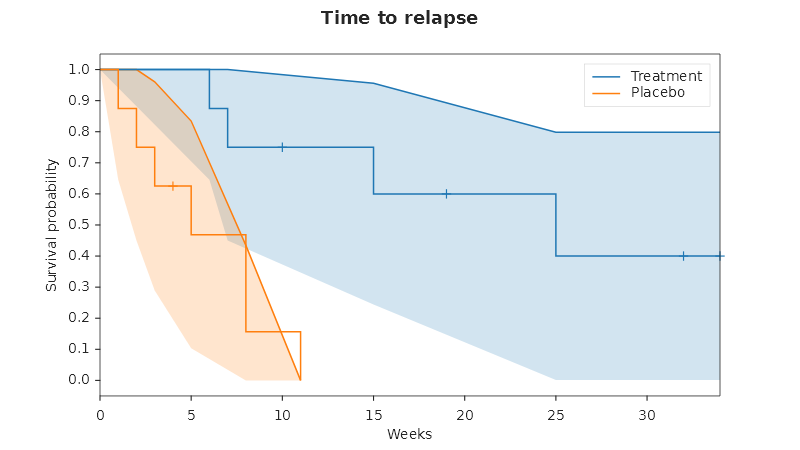
The estimate is the product-limit estimator. At a time when d events happen among n subjects still at risk, the curve drops to its level times (1 − d/n). All events at one time are one step, and a subject censored at an event time still counts as at risk then (events before censorings, as R's survival package and lifelines count them). A censored subject causes no step. The curve starts at 1 at time 0, and when the last follow-up is a censoring after the last event it runs on at its last level to that time. The arithmetic is counts and products only, so the curve is the same on every platform.
Each group is one line series drawn in steps, named in the legend after its group, with a Greenwood confidence band around the curve and a mark at every time a subject left without an event, both sharing the curve's own colour group. The Y axis is titled "Survival probability"; the X axis is yours to title, since the unit is your durations'. This is the curve, its band and its marks: no number-at-risk table and no log-rank test. A duration that is missing, negative or infinite is refused, because a subject without a time cannot be counted at risk; leave that subject out of the arrays if that is what you mean.
Raincloud
A half violin, a narrow box and a group's raw, jittered points side by side at the group's own index, all three sharing one colour so the three read as one group's three views of its own distribution. Several groups stand side by side, each at its own index, but still in the one colour: that colour names the trio, not the group, so groups compare on position, not on hue.
NamedSample[] routes =
[
    new("Highway", [22, 24, 23, 26, 25, 28, 24, 23, 27, 25, 30, 26]),
    new("Backroads", [18, 29, 15, 35, 20, 32, 17, 24, 21, 30, 16, 27]),
];

Plt.Create()
    .WithTitle("Commute time by route")
    .WithSize(600, 400)
    .AddSubPlot(1, 1, 1, ax => ax
        .Raincloud(routes)
        .SetYLabel("Minutes"))
    .Save("raincloud.svg");
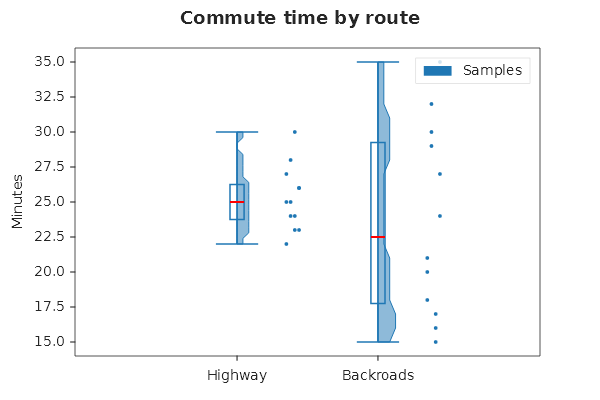
A multi-dataset ViolinSeries and BoxSeries already draw one shape per group on their own, so the verb adds one
violin and one box for the whole chart, not one pair per group, plus one scatter of every group's points together.
A point at index i of its group, standing at the group's own index g, is jittered to x = g + 0.35 + (i mod 4)
× 0.03, a fixed four-step cycle clear of the violin's half-width and the box's whisker caps — no randomness, so
the figure is the same on every run. Only the violin carries a label ("Samples"), so one legend swatch names the
trio rather than standing, falsely, for several differently coloured groups; the groups themselves are named along
the X axis. RaincloudParts hands you Violin, Box and Points. A group of no observations is refused.