Error Bars
Install:
dotnet add package MatPlotLibNet
Symmetric error bars
double[] x = [1, 2, 3, 4, 5];
double[] y = [2.1, 4.5, 3.2, 6.8, 5.1];
double[] yerr = [0.5, 0.3, 0.8, 0.4, 0.6];

Plt.Create()
    .AddSubPlot(1, 1, 1, ax => ax
        // One error array up and down: the same values are passed twice, which is what symmetric means.
        .ErrorBar(x, y, yerr, yerr, s =>
        {
            s.Color = Colors.Blue;
            s.Label = "Measurement";
        })
        .WithLegend())
    .Save("error_bars.svg");
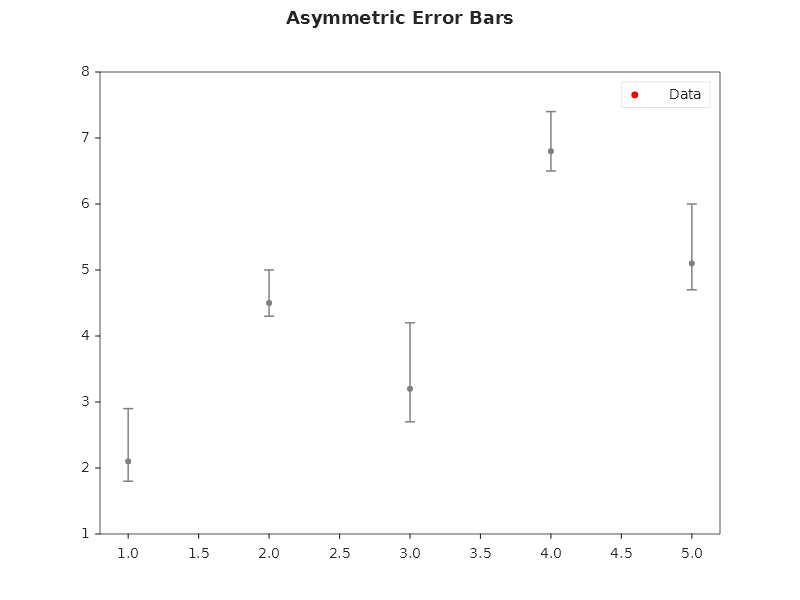
Asymmetric error bars
double[] yerrLow = [0.3, 0.2, 0.5, 0.3, 0.4];
double[] yerrHigh = [0.8, 0.5, 1.0, 0.6, 0.9];

Plt.Create()
    .AddSubPlot(1, 1, 1, ax => ax
        .ErrorBar(x, y, yerrLow, yerrHigh, s =>
        {
            s.Color = Css4Colors.DarkRed;
            s.CapSize = 6;        // width of the error bar caps
            s.LineWidth = 1.5;
        }))
    .Save("asymmetric_errors.svg");
Error bars with styling
Plt.Create()
    .AddSubPlot(1, 1, 1, ax => ax
        .ErrorBar(x, y, yerr, yerr, s =>
        {
            s.Color = Colors.Navy;
            s.CapSize = 8;
            s.LineWidth = 2.0;
            s.Label = "Experiment A";
        })
        .WithLegend())
    .Save("error_styled.svg");
Combined: scatter + error bars
Plt.Create()
    .AddSubPlot(1, 1, 1, ax => ax
        .Scatter(x, y, s =>
        {
            s.Color = Colors.Red;
            s.MarkerSize = 10;
            s.Marker = MarkerStyle.Diamond;
            s.Label = "Data";
        })
        .ErrorBar(x, y, yerrLow, yerrHigh, s =>
        {
            s.Color = Colors.Gray;
            s.CapSize = 5;
            s.LineWidth = 1.0;
        })
        .WithLegend())
    .Save("scatter_errors.svg");
Error bars with fill-between confidence band
double[] yUpper = y.Zip(yerrHigh, (v, e) => v + e).ToArray();
double[] yLower = y.Zip(yerrLow, (v, e) => v - e).ToArray();

Plt.Create()
    .AddSubPlot(1, 1, 1, ax => ax
        .Plot(x, y, s => { s.Color = Colors.Blue; s.Label = "Mean"; })
        .FillBetween(x, yLower, yUpper, s =>
        {
            s.Color = Colors.Blue;
            s.Alpha = 0.2;
            s.Label = "95% CI";
        })
        .WithLegend())
    .Save("error_confidence.svg");
Fluent API reference — ErrorBarSeries
| Property | Type | Default | Description |
|---|---|---|---|
Color |
Color |
auto | Line and cap color |
CapSize |
double |
5 |
Width of error bar caps in pixels |
LineWidth |
double |
1.5 |
Line width of the bars and the caps |
ELineWidth |
double? |
none | Width of the error bars alone (none: LineWidth) |
CapThick |
double? |
none | Thickness of the caps alone (none: LineWidth) |
ErrorEvery |
int |
1 |
Draw the error bars of every Nth point only |
XErrorLow, XErrorHigh |
double[] |
none | Horizontal errors to the left and right |
Label |
string |
none | Legend label |
Dumbbell chart (before vs after)
A dumbbell chart, two dots per category joined by a connector, is one call: ax.Dumbbell(categories, before, after). Its connector is an error bar with no error, spanning the two dots whichever is higher. See
Dumbbell chart on the bar charts page.
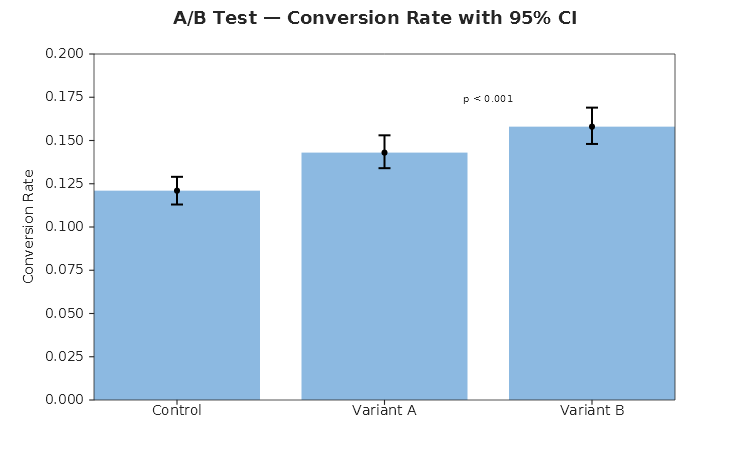
A/B test with confidence intervals
string[] variants = ["Control", "Variant A", "Variant B"];
double[] rates  = [0.121, 0.143, 0.158];
double[] errLo  = [0.008, 0.009, 0.010];
double[] errHi  = [0.008, 0.010, 0.011];
double[] xIdx   = [0.5, 1.5, 2.5];

Plt.Create()
    .WithTitle("A/B Test — Conversion Rate with 95% CI")
    .WithSize(750, 450)
    .AddSubPlot(1, 1, 1, ax => ax
        .Bar(variants, rates, s => { s.Color = Color.FromHex("#5B9BD5"); s.Alpha = 0.7; })
        .ErrorBar(xIdx, rates, errLo, errHi, s => { s.Color = Colors.Black; s.CapSize = 6; s.LineWidth = 2; })
        .Annotate("p < 0.001", 2.0, 0.172, s => s.Alignment = TextAlignment.Center)
        .SetYLabel("Conversion Rate")
        .SetYLim(0, 0.20))
    .Save("ab_test.svg");