Financial Charts
Install:
dotnet add package MatPlotLibNet
Financial dashboard template
The built-in FigureTemplates.FinancialDashboard creates a 3-panel layout. The top panel shows the price with Bollinger Bands. The middle panel shows volume. The bottom panel shows an oscillator, such as RSI or CCI.
FigureTemplates.FinancialDashboard(
        open, high, low, close, vol,
        title: "ACME Corp — 50 Day",
        configurePricePanel: ax => ax.BollingerBands(20),
        configureVolumePanel: ax => ax
            .SetYTickLocator(new MaxNLocator(3))
            .SetYTickFormatter(new EngFormatter()),
        configureOscillatorPanel: ax => ax
            .Rsi(close, 14)
            .SetYLim(0, 100)
            .AxHLine(70, l => { l.Color = Colors.Red;   l.LineStyle = LineStyle.Dashed; })
            .AxHLine(20, l => { l.Color = Colors.Green; l.LineStyle = LineStyle.Dashed; }))
    .WithSize(1200, 900)
    .Save("financial_dashboard.svg");
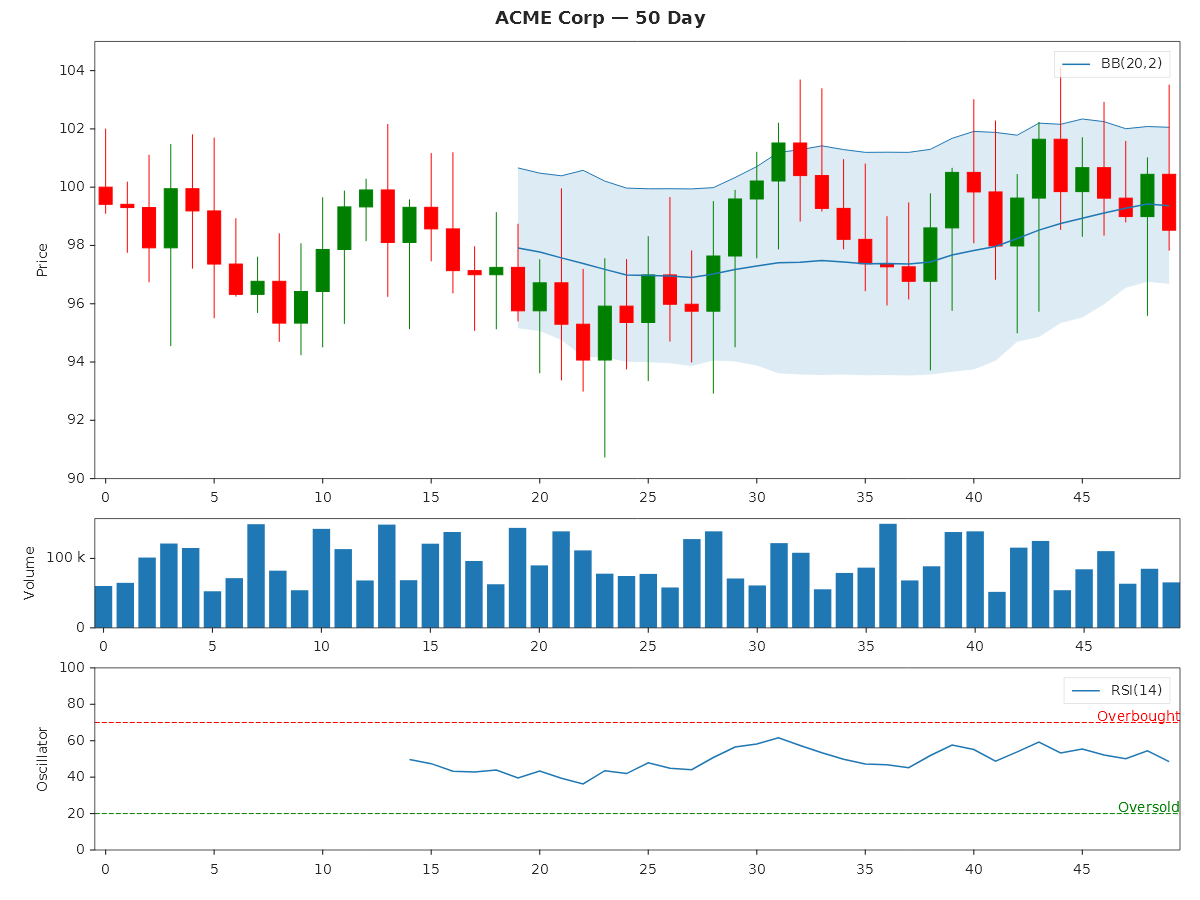
Technical indicators
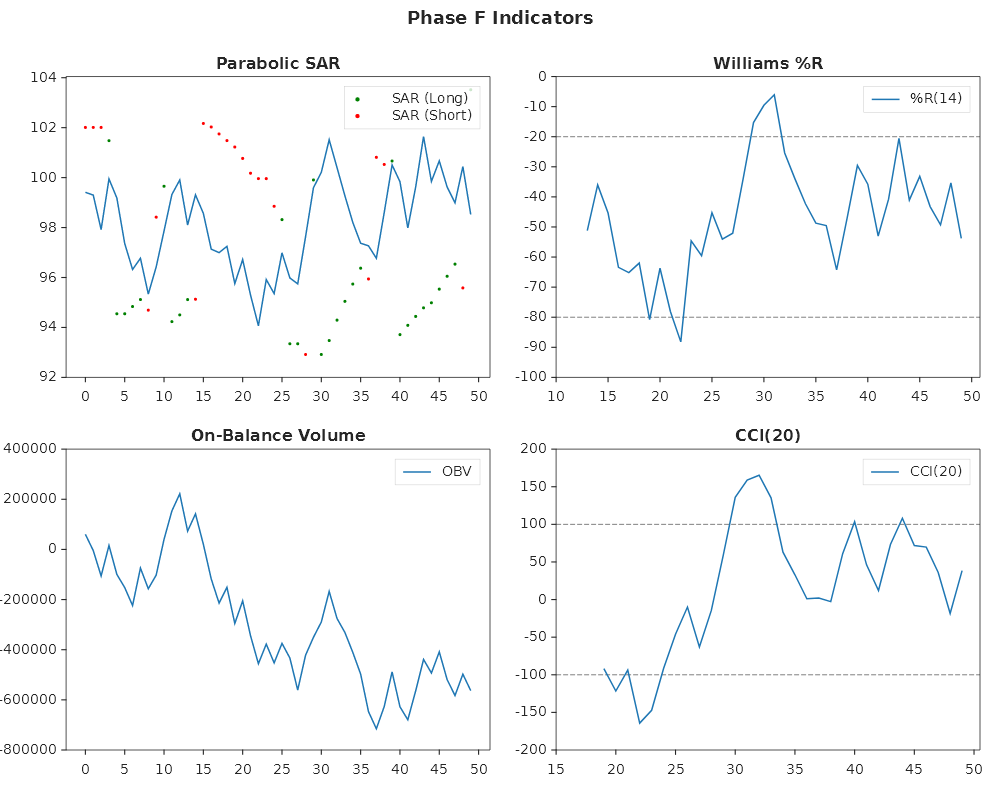
This example plots four indicators: Williams %R, On-Balance Volume, Parabolic SAR, and CCI:
Plt.Create()
    .WithTitle("Momentum and Volume Indicators")
    .WithSize(1000, 800)
    .WithGridSpec(2, 2)
    .TightLayout()
    .AddSubPlot(new GridPosition(0, 1, 0, 1), ax =>
    {
        ax.Plot(x, close);
        ax.ParabolicSar(high, low);
        ax.WithTitle("Parabolic SAR");
    })
    .AddSubPlot(new GridPosition(0, 1, 1, 2), ax =>
    {
        ax.WilliamsR(MatPlotLibNet.Indicators.OhlcvBars.Hlc(high, low, close), 14);
        ax.WithTitle("Williams %R");
    })
    .AddSubPlot(new GridPosition(1, 2, 0, 1), ax =>
    {
        ax.Obv(close, vol);
        ax.WithTitle("On-Balance Volume");
    })
    .AddSubPlot(new GridPosition(1, 2, 1, 2), ax =>
    {
        ax.Cci(MatPlotLibNet.Indicators.OhlcvBars.Hlc(high, low, close), 20);
        ax.WithTitle("CCI(20)");
    })
    .Save("phase_f_indicators.svg");
Relative Rotation Graph (RRG)
The RelativeRotation method renders a JdK-style 2D scatter of (RS-Ratio, RS-Momentum) per asset
against a benchmark. It adds a fading tail and a 100/100 quadrant grid.
Basic usage
// 104 weekly bars per asset, vs BTC benchmark
double[][] altCloses = [ethWeekly, bnbWeekly, solWeekly];
string[]   labels    = ["ETH", "BNB", "SOL"];

Plt.Create()
    .WithTitle("Crypto Rotation — Weekly DualEma(10,26)")
    .WithSize(900, 700)
    .AddSubPlot(1, 1, 1, ax => ax
        .SetXLabel("RS-Ratio")
        .SetYLabel("RS-Momentum")
        .RelativeRotation(altCloses, btcWeekly, labels, s =>
        {
            s.TailLength = 12;
            s.ColorMap   = QualitativeColorMaps.Tab10;
        }))
    .Save("rrg_crypto.svg");
With absorption + ENB overlays
When you have a portfolio-level absorption ratio and ENB (Effective Number of Bets), pass them as overlays. Each dot on the trail then also shows market stress:
// absorption[t] ∈ [0..1]: 0 = diversified (green), 1 = panic (red)
// enb[t]: larger = more diversified portfolio; radius ∝ ENB
double[] absorption = absorptionTimeSeries.AbsorptionRatio;
double[] enb        = absorptionTimeSeries.Enb;

Plt.Create()
    .WithTitle("Rotation + Risk Overlay")
    .WithSize(900, 700)
    .AddSubPlot(1, 1, 1, ax => ax
        .RelativeRotation(altCloses, btcWeekly, labels, s =>
        {
            s.AbsorptionRatioPerBar = absorption;
            s.EnbPerBar             = enb;
            s.TailLength            = 12;
        }))
    .Save("rrg_with_overlays.svg");
Visual encoding:
- The dot fill maps through RdYlGn reversed. Green means low absorption, and red means high absorption (panic).
- The asset colour becomes the edge ring of each dot.
- The dot radius is
max(1.5, enb × 1.5)px. The head dot is 1.5× larger than the trail dots. - A gray ghost trail is drawn behind the per-point circles.
Formula selection
// ZScore formula for equities-vs-index RRGs
ax.RelativeRotation(closes, benchmark, labels, s =>
{
    s.Formula          = RrgFormula.ZScore;
    s.ShortPeriod      = 14;   // rolling z-score window
    s.MomentumLookback = 14;   // ROC lookback before z-scoring momentum
});
See RelativeRotationSeries for minimum data requirements per formula.