Heatmaps & Colormaps
Install:
dotnet add package MatPlotLibNet
Heatmap with colorbar
double[,] matrix = new double[10, 10];
for (int r = 0; r < 10; r++)
    for (int c = 0; c < 10; c++)
        matrix[r, c] = Math.Sin(r * 0.5) * Math.Cos(c * 0.5);

Plt.Create()
    .AddSubPlot(1, 1, 1, ax => ax
        .WithTitle("Heatmap — Plasma")
        .Heatmap(matrix)
        .WithColorMap("plasma")
        .WithColorBar(cb => cb with { Label = "Intensity" }))
    .TightLayout()
    .Save("heatmap.svg");
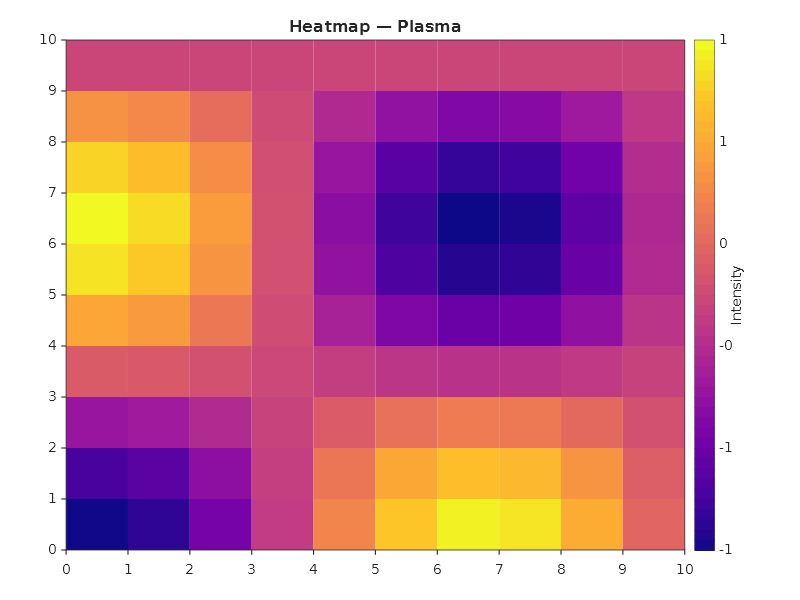
Each cell stands where its column and row put it in data coordinates, one unit wide and one high, so the cells move
with the axes: .SetXLim(2, 6) shows columns 2 to 5 across the whole plot, a limit set high to low turns the grid
round, and a zoom moves the cells with the axes like every other series.
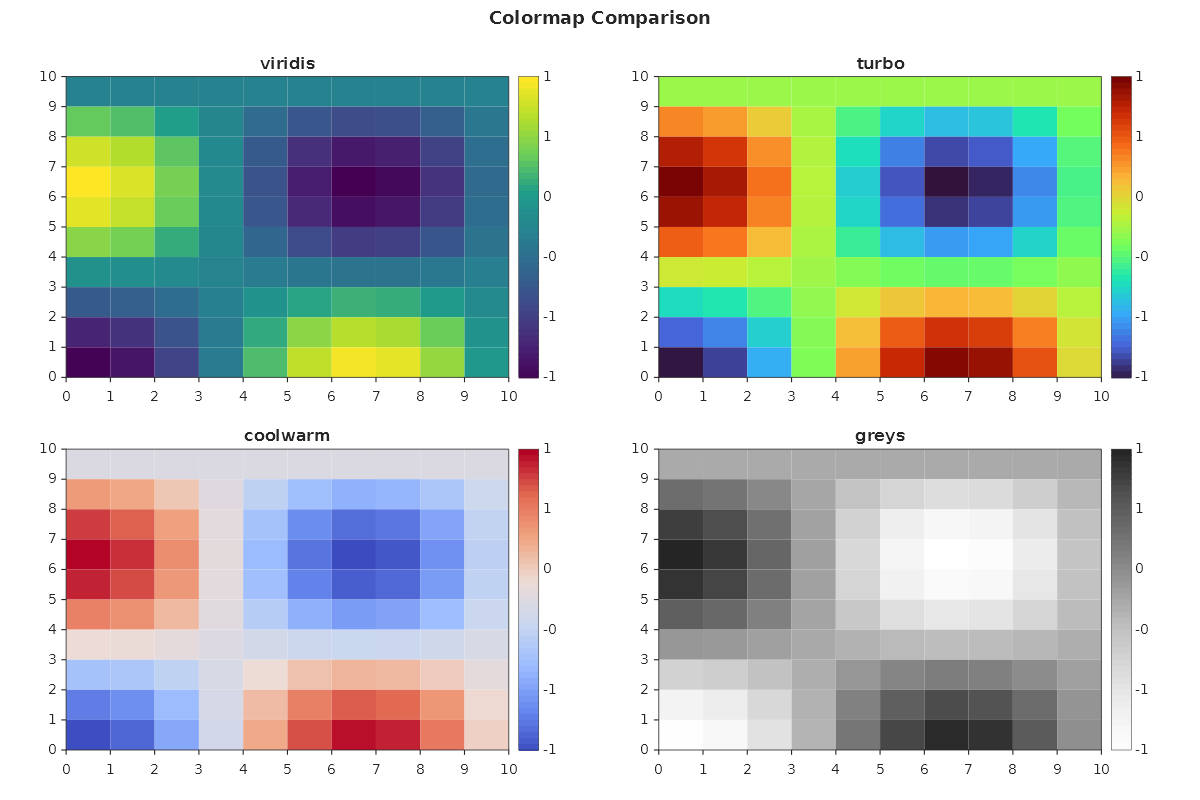
Colormap comparison
MatPlotLibNet ships 148 colormaps (74 base maps, each with an auto-registered reversed _r variant). Here are four popular ones side by side:
string[] maps = ["viridis", "turbo", "coolwarm", "greys"];
var builder = Plt.Create()
    .WithTitle("Colormap Comparison")
    .WithSize(1200, 800);

for (int i = 0; i < maps.Length; i++)
{
    var mapName = maps[i];
    builder.AddSubPlot(2, 2, i + 1, ax => ax
        .WithTitle(mapName)
        .Heatmap(matrix)
        .WithColorMap(mapName)
        .WithColorBar());
}

builder.TightLayout().Save("colormap_comparison.svg");
Colorbar customization
Plt.Create()
    .AddSubPlot(1, 1, 1, ax => ax
        .Heatmap(matrix)
        .WithColorMap("viridis")
        .WithColorBar(cb => cb with
        {
            Label = "Temperature (°C)",
            Orientation = ColorBarOrientation.Horizontal,
        }))
    .TightLayout()
    .Save("colorbar_custom.svg");
Color normalization
Control how data values map to colors:
// Log normalization — useful when data spans orders of magnitude
Plt.Create()
    .AddSubPlot(1, 1, 1, ax => ax
        .Heatmap(logData)
        .WithColorMap("plasma")
        .WithNormalizer(new LogNormalizer())
        .WithColorBar(cb => cb with { Label = "Log scale" }))
    .Save("heatmap_log.svg");

// Two-slope normalization — center on zero
Plt.Create()
    .AddSubPlot(1, 1, 1, ax => ax
        .Heatmap(divergingData)
        .WithColorMap("coolwarm")
        .WithNormalizer(new TwoSlopeNormalizer(center: 0))
        .WithColorBar(cb => cb with { Label = "Anomaly" }))
    .Save("heatmap_twoslope.svg");
Heatmap with custom series config
Plt.Create()
    .AddSubPlot(1, 1, 1, ax => ax
        .Heatmap(matrix, s =>
        {
            s.ColorMap = ColorMaps.Turbo;
        })
        .WithColorBar())
    .Save("heatmap_series.svg");
Annotated heatmap (correlation matrix)
ShowLabels = true renders each cell's numeric value on top of the colour fill. The text
colour is chosen per cell, black or white, using Rec. 709 luminance, so labels stay
readable across the colour map. Use LabelFormat with any standard .NET numeric
format string, for example "F2" (the default) for two decimals or "P1" for percent.
double[,] corr = ComputeCorrelationMatrix(returns);

Plt.Create()
    .AddSubPlot(1, 1, 1, ax => ax
        .WithTitle("Asset Correlation Matrix")
        .Heatmap(corr, s =>
        {
            s.ColorMap = new ReversedColorMap(DivergingColorMaps.RdBu);
            s.ShowLabels = true;
            s.LabelFormat = "F2";
        })
        .WithColorBar())
    .Save("heatmap_annotated.svg");
Override the auto-contrast text colour with CellValueColor when you want the labels to
match a brand colour or stay constant across the matrix.
A colour map travels with the figure through JSON (ToJson, the MCP server, the transports): a map the library
ships goes by its name, a map built in code (new LinearColorMap(...), new ListedColorMap(...),
new ReversedColorMap(...)) goes as its colours, with its under, over and bad colours. A map of a type you write
yourself is code, which JSON cannot carry: it travels only by the name it is registered under with
ColorMapRegistry.Register.
Triangular-mask heatmap
A symmetric matrix (correlation, covariance, distance) holds the same values above and
below the diagonal. MaskMode hides the redundant half, so each pair is shown once.
The strict variants also hide the diagonal, which is a constant 1 for correlation matrices.
Plt.Create()
    .AddSubPlot(1, 1, 1, ax => ax
        .WithTitle("Lower-triangle correlation")
        .Heatmap(corr, s =>
        {
            s.ColorMap = new ReversedColorMap(DivergingColorMaps.RdBu);
            s.ShowLabels = true;
            s.MaskMode = HeatmapMaskMode.UpperTriangleStrict;  // hide upper half + diagonal
        })
        .WithColorBar())
    .Save("heatmap_lower_triangle.svg");
HeatmapMaskMode values:
| Value | Hides cells where | Diagonal kept? |
|---|---|---|
None |
(nothing) | yes |
UpperTriangle |
col > row |
yes |
LowerTriangle |
col < row |
yes |
UpperTriangleStrict |
col >= row |
no |
LowerTriangleStrict |
col <= row |
no |
Image (imshow)
Display 2D arrays as images:
Plt.Create()
    .AddSubPlot(1, 1, 1, ax => ax
        .Image(matrix)
        .WithColorMap("gray")
        .WithColorBar())
    .Save("imshow.svg");
2D histogram (density)
var rng = new Random(42);
// Box-Muller: a normally distributed sample built from two uniform ones.
double Gaussian(double mean, double sd) =>
    mean + sd * Math.Sqrt(-2 * Math.Log(rng.NextDouble())) * Math.Cos(2 * Math.PI * rng.NextDouble());
double[] x = Enumerable.Range(0, 5000).Select(_ => Gaussian(0, 1)).ToArray();
double[] y = Enumerable.Range(0, 5000).Select(_ => Gaussian(0, 1)).ToArray();

Plt.Create()
    .AddSubPlot(1, 1, 1, ax => ax
        .Histogram2D(x, y, bins: 30)
        .WithColorMap("viridis")
        .WithColorBar(cb => cb with { Label = "Count" }))
    .Save("hist2d.svg");
Pseudocolor mesh
Plt.Create()
    .AddSubPlot(1, 1, 1, ax => ax
        .Pcolormesh(xEdges, yEdges, data)
        .WithColorMap("inferno")
        .WithColorBar())
    .Save("pcolormesh.svg");
Popular colormaps
| Category | Colormaps |
|---|---|
| Perceptual | viridis, plasma, inferno, magma, cividis |
| Sequential | greys, purples, blues, greens, oranges, reds |
| Diverging | coolwarm, RdBu, PiYG, PRGn, BrBG, seismic |
| Cyclic | twilight, hsv |
| Qualitative | tab10, tab20, Set1, Set2, Set3, Pastel1, Paired |
| Accessible | okabe_ito, petroff6, petroff8, petroff10 |
| Other | turbo, jet, hot, cool, spring, summer, autumn, winter |
The accessible row is the one to reach for when a chart has to be read by everyone. okabe_ito is the
eight-colour palette from Okabe and Ito; petroff6, petroff8 and petroff10 are the sequences from
Petroff's Accessible Color Sequences for Data Visualization, which pick colours so that every pair inside
a sequence stays apart under the common forms of colour blindness, and in grayscale as well. Pick the one
whose number matches how many things you are drawing: a six-series chart drawn with the ten-colour sequence
gets six colours that were chosen to sit beside four others. They are the same values matplotlib ships under
those names.
Calendar heatmap (GitHub-style)
One cell per day, coloured by its value: seven weekday rows by one column per week, from the dates as you hold them.
var rng = new Random(7);
var first = new DateTime(2025, 1, 1);
DateTime[] days = [.. Enumerable.Range(0, 365).Select(d => first.AddDays(d))];
double[] commits = [.. days.Select(d =>
    d.DayOfWeek is DayOfWeek.Saturday or DayOfWeek.Sunday ? rng.Next(0, 3) : rng.Next(0, 12))];

// White to dark green; a day with no value is grey, so it does not read as a zero.
var greens = new LinearColorMap("commits", [Color.FromHex("#FFFFFF"), Color.FromHex("#00441B")])
{
    BadColor = Color.FromHex("#DDDDDD"),
};

Plt.Create()
    .WithTitle("Calendar Heatmap — Contributions")
    .WithSize(1100, 300)
    .AddSubPlot(1, 1, 1, ax => ax
        .CalendarHeatmap(days, commits, configure: s => s.ColorMap = greens))
    .Save("calendar_heatmap.svg");
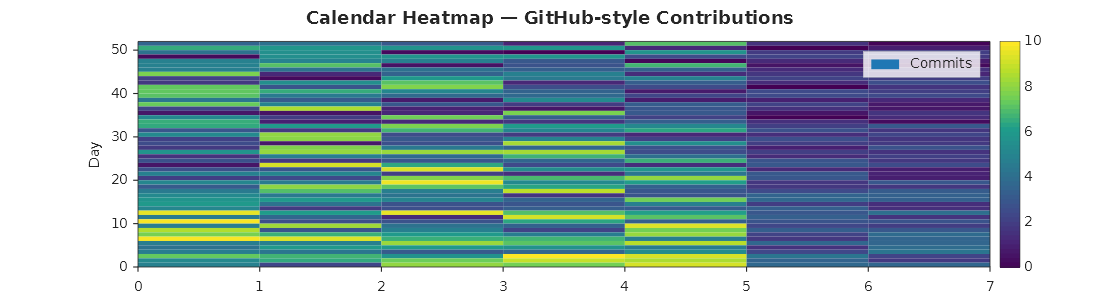
CalendarHeatmap lays the days out itself: the grid runs from the week of the earliest date to the week of the
latest, the week start in the top row (Monday unless you pass another DayOfWeek), all seven weekdays named on
the Y axis and each month named under the column that holds its 1st. A whole year is 53 week columns, and 54 when
a leap year starts on the last day of a week. The week start is the one you pass, never the machine's culture, and
the day and month names are English abbreviations under every culture, so the same call draws the same picture
everywhere.
A day's cell holds the sum of the values given for it, whatever their time of day. A day without a value is blank:
transparent, or the colour map's BadColor when it has one, as above. Under a map that starts at white, a blank
day and a zero look alike without it. A zero is a value and wears the bottom of the scale. The chart is one heatmap
series with a colour bar as its key; the last argument styles it. The verb sets no limits and no aspect: the cells
fill the plot, so their shape follows the figure. A short, wide figure such as 1100 × 300 reads closest to the
familiar shape.
Spy plot: where a matrix is not zero
A spy plot marks every cell of a matrix whose magnitude is above a threshold, so the pattern of the non-zero cells (a band, a block, fill-in) shows at a glance:
// A banded matrix: the diagonal and the two diagonals beside it, and one dense block.
var band = new double[20, 20];
for (int r = 0; r < 20; r++)
{
    for (int c = Math.Max(0, r - 1); c <= Math.Min(19, r + 1); c++)
    {
        band[r, c] = 1;
    }
}
for (int r = 14; r < 18; r++)
{
    for (int c = 2; c < 6; c++)
    {
        band[r, c] = -0.5;
    }
}

Plt.Create()
    .WithTitle("A tridiagonal matrix with one block")
    .WithSize(500, 500)
    .AddSubPlot(1, 1, 1, ax => ax
        .Spy(band, configure: s => s.MarkerSize = 12))
    .Save("spy_plot.svg");
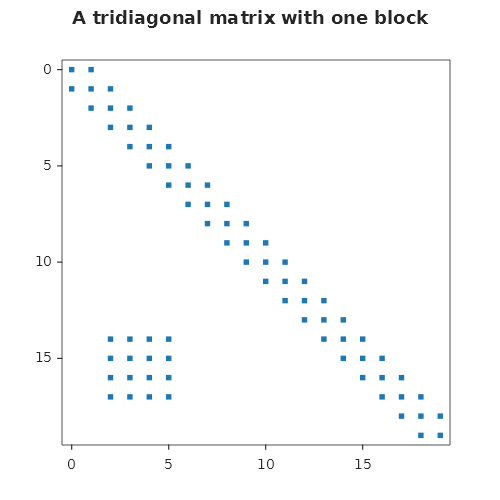
A cell is marked when Math.Abs(value) > threshold (0 unless you pass one): a negative value counts by its size,
a cell exactly at the threshold is not marked, and a missing value (double.NaN) is no marker. Column numbers run
along X and row numbers down Y, row 0 on top as a matrix is written, and the axes run half a cell past the first
and last row and column, so a marker on an edge cell is whole. The ticks are whole cell numbers, at most nine
intervals across. The chart is one scatter series of square markers; the last argument styles it.
A marker is a size in points, not in cells, so a larger matrix has the same markers on a finer grid: lower
MarkerSize for a large matrix, or the markers merge. The cells are square only on a figure with the matrix'
proportions; the verb sets no aspect.