International text
Install:
dotnet add package MatPlotLibNetanddotnet add package MatPlotLibNet.Skiafor the text shaping and the PNG export
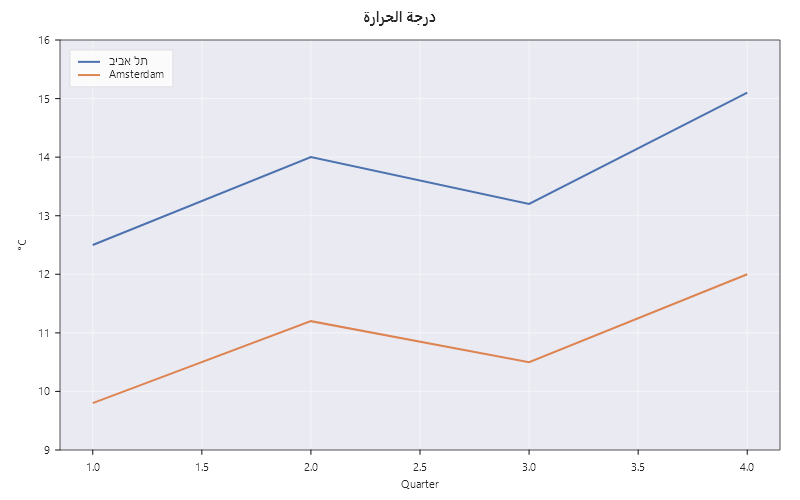
Labels, titles and legend entries can be written in any script. Arabic and Hebrew work without any setup: the letters join where the script joins them, the words read from right to left, and a Latin word or a number inside them stays where a reader expects it. Other scripts, such as Devanagari, Thai or Chinese, need a font that has their letters. This page shows both.
Arabic and Hebrew work without any setup
The font that ships with MatPlotLibNet.Skia (DejaVu Sans) covers Arabic and Hebrew, and the library shapes text
the way a browser or a word processor does. Write the label as you would type it, in reading order:
Plt.Create()
    .WithTitle("درجة الحرارة")                       // Arabic title: "temperature"
    .AddSubPlot(1, 1, 1, ax =>
    {
        ax.SetXLabel("Quarter");
        ax.SetYLabel("°C");
        ax.Plot([1, 2, 3, 4], [12.5, 14.0, 13.2, 15.1], s => s.Label = "תל אביב");   // Hebrew legend entry
        ax.Plot([1, 2, 3, 4], [9.8, 11.2, 10.5, 12.0],  s => s.Label = "Amsterdam");
        ax.WithLegend();
    })
    .Save("international.svg");
The library handles the text in three steps:
- The bidi algorithm (Unicode's UAX #9) works out which direction each character reads in. The whole standard is implemented and checked against Unicode's own test files, all 861,948 cases.
- The text is cut into runs where the direction or the script changes. Each run is shaped by HarfBuzz in its own script, so Arabic letters get their joined forms and Latin pairs like "Ta" get their kerning.
- The runs are laid out in visual order. "Temp درجة" draws the Latin word on the left and the Arabic word on the right; "درجة 12" keeps the digits in order inside the right-to-left line.
The same shaping is used for measuring, for the glyph outlines in an SVG, and for the pixels in a PNG or PDF, so a label's measured size always matches what is drawn.
SVG without the Skia package
Seven of the packages render SVG without loading MatPlotLibNet.Skia: Blazor, ASP.NET Core, GraphQL, Interactive,
Notebooks, DataFrame and Geo. Their SVG carries text as <text> elements, and the browser shapes it. The library
adds direction="rtl" to a label whose first strong character reads right to left, so the browser puts the
punctuation at the end of a Hebrew title on the correct side. Alignment stays geometric: TextAlignment.Left means
the left edge, whichever way the text reads.
Other scripts: register a font file
Devanagari, Thai, Chinese, Japanese and Korean letters are not in DejaVu Sans. Register a font file once, at startup, and name its family in the theme or the text style:
using MatPlotLibNet.Skia;

var font = SkiaFonts.Register("fonts/NotoSansDevanagari-Regular.ttf");
// font.Family is "Noto Sans Devanagari"; font.Weight and font.Slant say which face the file holds.

var theme = Theme.CreateFrom(Theme.Seaborn)
    .WithFont(f => f with { Family = font.Family })
    .Build();

Plt.Create()
    .WithTitle("तापमान")
    .WithTheme(theme)
    .Plot([1, 2, 3], [20, 22, 21])
    .Save("devanagari.png");
SkiaFonts.Register also takes a Stream. It returns the family name the file declares, which is the name to put
in Font.Family. Registering the same family and face twice throws; registering a face of DejaVu Sans replaces the
bundled one and reports that through ChartDiagnostics.
A font that is installed on the machine can be used by name alone, without registering anything. The registered fonts are tried first, then the fonts the operating system knows.
When a font is missing
If no font of the requested family can be found, the chart is drawn with the operating system's default face and
a message is raised once per family through ChartDiagnostics.Emitted. Subscribe to it to see the family name and
the face that was used instead:
ChartDiagnostics.Emitted += d => Console.Error.WriteLine($"{d.Source}: {d.Message}");
The MCP server
dnx MatPlotLibNet.Mcp runs in a host that never calls your code, so it reads the MATPLOTLIBNET_FONTS
environment variable at startup. The value lists font files and directories of font files, separated by ;.
Each file is registered as above. A bad entry is logged and skipped; the server still starts.
{
  "servers": {
    "MatPlotLibNet.Mcp": {
      "type": "stdio",
      "command": "dnx",
      "args": ["MatPlotLibNet.Mcp", "--yes"],
      "env": { "MATPLOTLIBNET_FONTS": "C:/fonts/NotoSansDevanagari-Regular.ttf;C:/fonts/cjk" }
    }
  }
}
What changed for Latin text
Shaping applies the font's kerning to every text. In DejaVu Sans at 13 px, "Ta" is 2.15 px narrower than it was before, and "AV" is 0.85 px narrower. Widths, margins and label positions move by that much. matplotlib has always kerned, so charts now match its output more closely.
Limits
MatPlotLibNet.Mauidraws text through the platform's own text engine, which shapes on its own.- Line breaking is by width, per line, so a wrapped caption in a right-to-left script is ordered correctly line by line.
- The bundled font has no Devanagari, Thai, Chinese, Japanese or Korean glyphs; those need a registered font.