Polar Charts
Install:
dotnet add package MatPlotLibNet
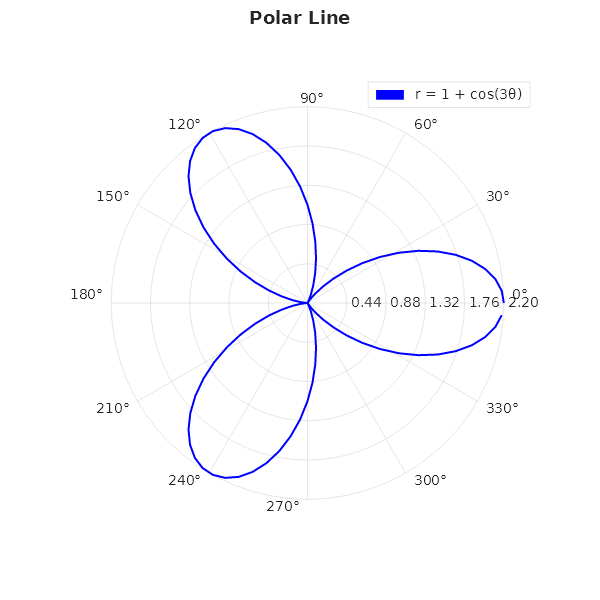
Polar line
double[] theta = Enumerable.Range(0, 100)
    .Select(i => i * 2 * Math.PI / 100).ToArray();
double[] r = theta.Select(t => 1 + Math.Cos(3 * t)).ToArray();

Plt.Create()
    .AddSubPlot(1, 1, 1, ax => ax
        .PolarPlot(r, theta, s =>
        {
            s.Color = Colors.Blue;
            s.LineWidth = 2.0;
            s.LineStyle = LineStyle.Solid;
            s.Label = "r = 1 + cos(3θ)";
        })
        .WithLegend())
    .Save("polar_line.svg");
Multi-series polar
Plt.Create()
    .AddSubPlot(1, 1, 1, ax => ax
        .PolarPlot(r1, theta, s => { s.Color = Colors.Blue; s.Label = "cos(3θ)"; })
        .PolarPlot(r2, theta, s => { s.Color = Colors.Red; s.LineStyle = LineStyle.Dashed; s.Label = "sin(2θ)"; })
        .WithLegend(LegendPosition.UpperRight))
    .Save("polar_multi.svg");
Radar chart
string[] categories = ["Speed", "Power", "Defense", "Range", "Accuracy"];
double[] values = [85, 70, 90, 60, 95];

Plt.Create()
    .AddSubPlot(1, 1, 1, ax => ax
        .Radar(categories, values, s =>
        {
            s.Color = Colors.Blue;
            s.Alpha = 0.3;   // fill transparency
        }))
    .Save("radar.svg");
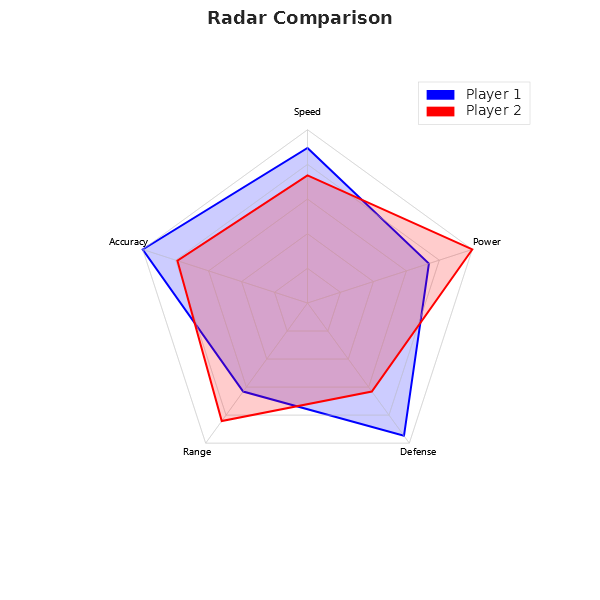
Radar comparison (two players)
double[] player1 = [85, 70, 90, 60, 95];
double[] player2 = [70, 95, 60, 80, 75];

Plt.Create()
    .AddSubPlot(1, 1, 1, ax => ax
        .Radar(categories, player1, s => { s.Color = Colors.Blue; s.Alpha = 0.2; s.Label = "Player 1"; })
        .Radar(categories, player2, s => { s.Color = Colors.Red;  s.Alpha = 0.2; s.Label = "Player 2"; })
        .WithLegend())
    .Save("radar_comparison.svg");
Polar bar
double[] barTheta = Enumerable.Range(0, 8).Select(i => i * Math.PI / 4).ToArray();
double[] barR = [3, 5, 7, 4, 6, 8, 2, 5];

Plt.Create()
    .AddSubPlot(1, 1, 1, ax => ax
        .PolarBar(barR, barTheta, s =>
        {
            s.Color = Colors.Teal;
            s.Alpha = 0.7;
            s.BarWidth = 0.35;
        }))
    .Save("polar_bar.svg");
Polar scatter
Plt.Create()
    .AddSubPlot(1, 1, 1, ax => ax
        .PolarScatter(r, theta, s =>
        {
            s.Color = Css4Colors.Purple;
            s.MarkerSize = 4;
            s.Label = "Measurements";
        })
        .WithLegend())
    .Save("polar_scatter.svg");
Polar heatmap
var data = new double[12, 8]; // 12 angular bins × 8 radial bins
for (int t = 0; t < 12; t++)
    for (int r = 0; r < 8; r++)
        data[t, r] = Math.Sin(t * 0.5) * Math.Cos(r * 0.4);

Plt.Create()
    .AddSubPlot(1, 1, 1, ax => ax
        .PolarHeatmap(data, thetaBins: 12, rBins: 8)
        .WithColorMap("viridis")
        .WithColorBar())
    .Save("polar_heatmap.svg");
Wind rose
How often the wind blows from each of eight directions, as one bar per direction. A polar bar takes its angle in radians, counted counter-clockwise from the right (east), as matplotlib's polar axes do, and the angle labels count the same way, so north stands at 90°. A compass bearing counts clockwise from north, so it is turned first:
double[] bearings  = [0, 45, 90, 135, 180, 225, 270, 315];          // N, NE, E, SE, S, SW, W, NW
double[] frequency = [9.5, 7.8, 12.8, 6.3, 9.4, 14.1, 10.1, 7.1];   // % of the hours, all speeds
double[] theta = [.. bearings.Select(b => (90 - b) * Math.PI / 180)];

Plt.Create()
    .WithTitle("Wind Rose — share of the hours by direction")
    .WithSize(600, 600)
    .AddSubPlot(1, 1, 1, ax => ax
        .PolarBar(frequency, theta, s =>
        {
            s.Color = Color.FromHex("#2E86C1");
            s.Alpha = 0.85;
            s.BarWidth = 0.9 * Math.PI / 4;   // radians: nine tenths of the 45° between two directions
        }))
    .Save("wind_rose.svg");
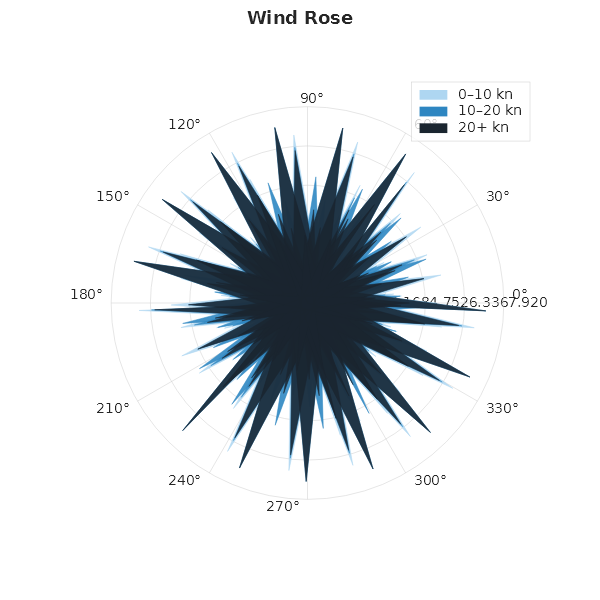
A wind rose often splits each direction by wind speed, the slow winds near the centre and the fast ones stacked outside them. That is not drawn yet. A polar bar always starts at the centre, and each polar bar series is scaled to its own largest bar, so the bars of two series laid over each other do not share one radial scale and cannot be compared. Draw one series per chart until polar bars can be stacked.