Themes
Install:
dotnet add package MatPlotLibNet
Applying a theme
Plt.Create()
    .WithTheme(Theme.Dracula)
    .Plot(x, y, s => s.Label = "Data")
    .WithLegend()
    .Save("dracula.svg");
30 built-in themes
Light themes
| Theme | Usage | Style |
|---|---|---|
Theme.Default |
General purpose | White bg, tab10 colors |
Theme.Seaborn |
Statistical | Light gray bg, subtle grid |
Theme.Ggplot |
R ggplot2 style | Gray bg, white grid |
Theme.FiveThirtyEight |
Journalism | Bold, no spines |
Theme.Bmh |
Academic | Teal/salmon cycle |
Theme.Solarize |
Solarized palette | Cream bg |
Theme.Grayscale |
Print-friendly | Grayscale-only series palette (no hues) |
Theme.Paper |
Academic papers | Serif font, size 11, no grid |
Theme.Presentation |
Slides | Bold weight, size 16 |
Theme.Poster |
Conference posters | Bold weight, size 20, thicker grid (1.5 linewidth) |
Theme.GitHub |
GitHub style | GitHub brand palette (#0366D6, #28A745, #6F42C1, #D73A49, #E36209), subtle #E1E4E8 grid |
Theme.Minimal |
Tufte-inspired | No grid, size 11 |
Theme.Retro |
Vintage | Warm yellows/browns |
Theme.MatplotlibClassic |
Pre-2.0 matplotlib | bgrcmyk cycle |
Theme.MatplotlibV2 |
Modern matplotlib | tab10, soft-black |
Dark themes
| Theme | Usage | Style |
|---|---|---|
Theme.Dark |
General dark mode | Dark bg, bright colors |
Theme.Cyberpunk |
Neon on dark | Green neon on purple/black |
Theme.Nord |
Nord palette | Arctic blues/greens |
Theme.Dracula |
Dracula palette | Purple/pink/cyan |
Theme.Monokai |
Editor classic | Monokai colors |
Theme.Catppuccin |
Warm pastels | Pastel on dark |
Theme.Gruvbox |
Retro warm | Gruvbox tones |
Theme.OneDark |
Atom editor | Subtle muted |
Theme.Neon |
Bright neon | Neon green on black |
Accessibility themes
| Theme | Usage |
|---|---|
Theme.ColorBlindSafe |
Okabe-Ito palette |
Theme.HighContrast |
WCAG AAA |
Operator themes
Four grounds for a control-room wall. They differ in background and in the brightness of the alarm colours, never in
what those colours mean. Each carries an AlarmPalette (theme.Alarm) for the dashboard tiles and timelines.
| Theme | Usage |
|---|---|
Theme.OpsNight |
Cool dark neutral, for a dimmed room |
Theme.OpsPanel |
The light grey of a physical control panel |
Theme.OpsWarm |
Warm dark, where a cool grey reads clinical |
Theme.OpsContrast |
Near-black with brightened alarms, for a video wall read from across the room |
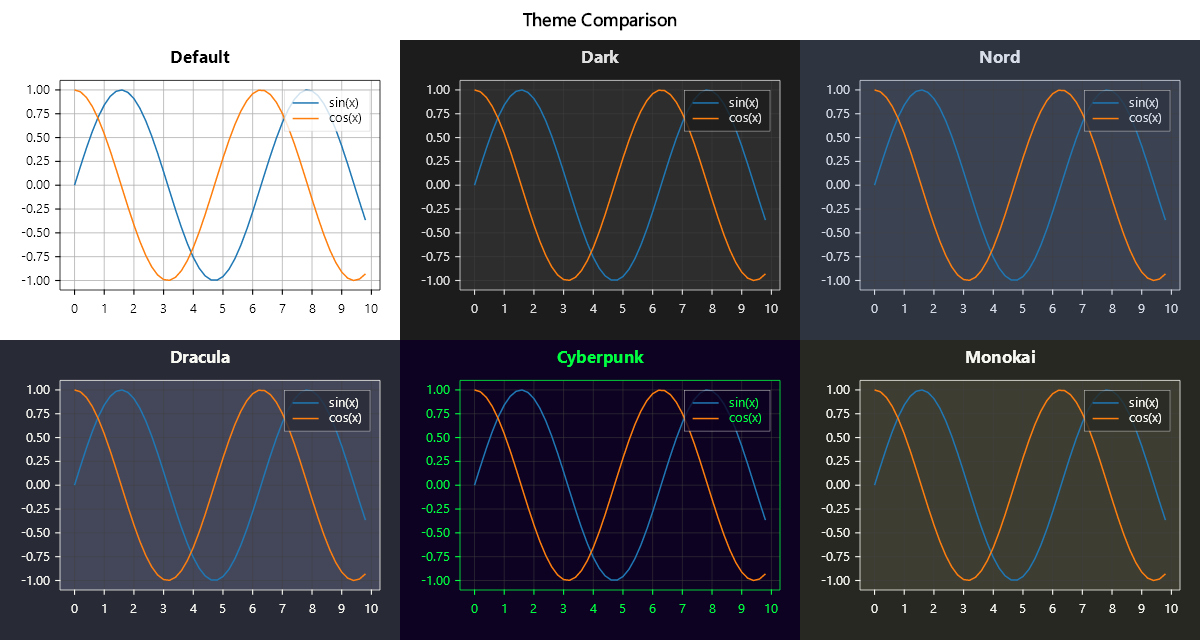
Theme comparison
string[] themes = ["Default", "Dark", "Nord", "Dracula", "Cyberpunk",
                   "Monokai", "Catppuccin", "Gruvbox", "OneDark", "Neon"];

foreach (var name in themes)
{
    var theme = typeof(Theme).GetProperty(name)!.GetValue(null) as Theme;
    Plt.Create()
        .WithTheme(theme!)
        .WithTitle(name)
        .Plot(x, y, s => s.Label = "sin(x)")
        .WithLegend()
        .Save($"theme_{name}.svg");
}
Custom theme with ThemeBuilder
Build your own theme from scratch or derive from an existing one:
var custom = Theme.CreateFrom(Theme.Dark)
    .WithBackground(Color.FromHex("#1e1e2e"))
    .WithForegroundText(Colors.White)
    .WithAxesBackground(Color.FromHex("#282a36"))
    .WithCycleColors(Colors.Cyan, Css4Colors.Pink, Colors.Green, Colors.Yellow)
    .WithFont(f => f with { Family = "JetBrains Mono", Size = 11 })
    .WithGrid(g => g with
    {
        Color = Color.FromHex("#44475a"),
        LineStyle = LineStyle.Dotted,
        Alpha = 0.5
    })
    .Build();

Plt.Create()
    .WithTheme(custom)
    .WithTitle("Custom Theme")
    .Plot(x, y1, s => s.Label = "Series 1")
    .Plot(x, y2, s => s.Label = "Series 2")
    .WithLegend()
    .Save("custom_theme.svg");
Custom PropCycler
Control how colors, line styles, line widths and markers cycle across the series of a multi-series plot. The series at place i takes the cycler's entry i, in the plot and in its legend entry; a series that sets one of these itself keeps its own:
var cycler = new PropCyclerBuilder()
    .WithColors(Colors.Cyan, Colors.Magenta, Colors.Gold, Css4Colors.LimeGreen)
    .WithLineStyles(LineStyle.Solid, LineStyle.Dashed, LineStyle.DashDot, LineStyle.Dotted)
    .Build();

var theme = Theme.CreateFrom(Theme.Dark)
    .WithPropCycler(cycler)
    .Build();
Theme with 3D pane colors
var theme3d = Theme.CreateFrom(Theme.Dark)
    .WithBackground(Color.FromHex("#1a1a2e"))
    .WithForegroundText(Colors.White)
    .Build();

Plt.Create()
    .WithTheme(theme3d)
    .AddSubPlot(1, 1, 1, ax => ax
        .Surface(x, y, z)
        .WithPane3D(p => p with
        {
            FloorColor = Color.FromHex("#2A2A2A"),
            LeftWallColor = Color.FromHex("#222222"),
            RightWallColor = Color.FromHex("#333333"),
            Alpha = 0.8,
        })
        .WithCamera(elevation: 30, azimuth: -50))
    .Save("themed_3d.svg");
Theme background shortcut
// Quick way to set just the background
Plt.Create()
    .WithBackground(Color.FromHex("#f5f5dc"))  // beige
    .WithTheme(Theme.Paper)
    .Plot(x, y)
    .Save("paper_bg.svg");
Fluent API reference
| Method | Description |
|---|---|
.WithTheme(Theme preset) |
Apply a built-in or custom theme |
.WithBackground(Color) |
Override figure background |
Theme.CreateFrom(base) |
Start a ThemeBuilder from existing theme |
.WithForegroundText(Color) |
Text/foreground color |
.WithAxesBackground(Color) |
Axes area background |
.WithCycleColors(params Color[]) |
Color cycle for series |
.WithFont(Func<Font, Font>) |
Default font (family, size, weight) |
.WithGrid(Func<GridStyle, GridStyle>) |
Grid appearance |
.WithPropCycler(PropCycler) |
Multi-property cycler |
.Build() |
Return customized Theme |