Tick Formatting
Install:
dotnet add package MatPlotLibNet
Engineering notation
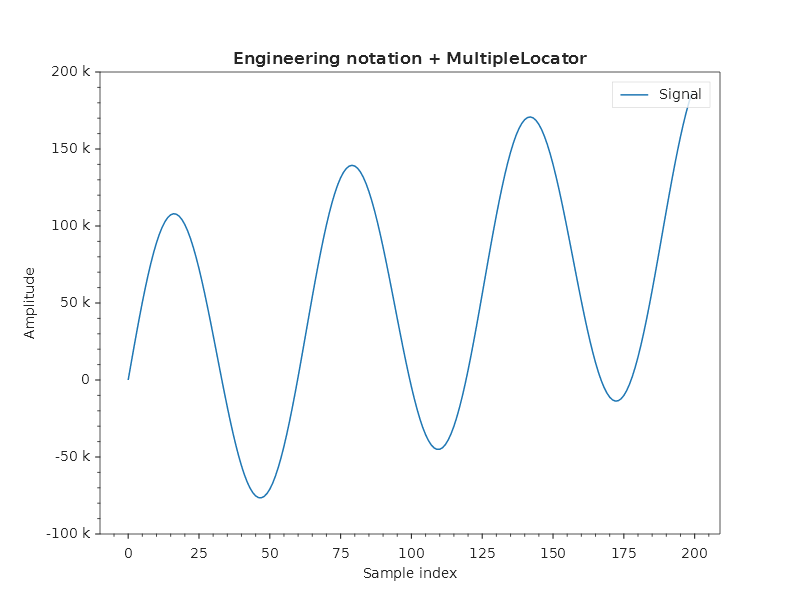
EngFormatter displays values as 100k, 50M, 2.5G:
Plt.Create()
    .AddSubPlot(1, 1, 1, ax => ax
        .WithTitle("Engineering notation + MultipleLocator")
        .SetXLabel("Sample index")
        .SetYLabel("Amplitude")
        .Plot(x, y, line => { line.Label = "Signal"; })
        .SetYTickFormatter(new EngFormatter())
        .SetXTickLocator(new MultipleLocator(25))
        .WithMinorTicks())
    .Save("tick_locators.svg");
Date axes
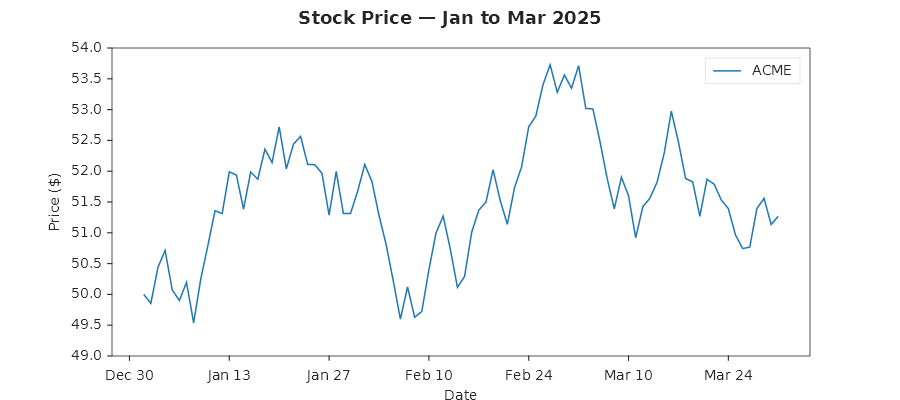
Pass a DateTime[] array and the axis uses AutoDateLocator automatically:
DateTime[] dates = Enumerable.Range(0, 90)
    .Select(i => new DateTime(2025, 1, 1).AddDays(i))
    .ToArray();

Plt.Create()
    .WithTitle("Stock Price — Jan to Mar 2025")
    .AddSubPlot(1, 1, 1, ax => ax
        .SetXLabel("Date")
        .SetYLabel("Price ($)")
        .Plot(dates, prices, line => { line.Color = Colors.Tab10Blue; })
        .WithLegend(LegendPosition.UpperRight))
    .Save("date_axis.svg");
Rotated tick labels
When X-axis tick labels are dense enough to overlap, for example 31 daily date labels in a narrow plot, the renderer rotates them to 30° on its own. This matches matplotlib's Figure.autofmt_xdate() behaviour. You can also set any angle yourself:
Plt.Create()
    .AddSubPlot(1, 1, 1, ax => ax
        .Plot(dates, prices)
        .WithXTickLabelRotation(45)       // force 45°; auto-rotate is bypassed
        .SetXDateFormat("yyyy-MM-dd"))
    .Save("rotated_ticks.svg");
Both axes support rotation, through WithXTickLabelRotation(double) and WithYTickLabelRotation(double). Pass 0 to restore horizontal labels. Dense X-axis labels still auto-rotate to 30° unless you set a different angle.
The layout measures X labels as they are drawn, turned or not: the bottom margin holds what a turned label reaches below the axis, and the X axis title stands clear below it, in the default layout and under TightLayout(). Whether crowded labels turn depends on how wide the plot is, so the same names can stand upright under a wide plot and turn under a narrow one.
Internally, the TickConfig.LabelRotation property drives the rotation overload of SvgRenderContext.DrawText, which emits transform="rotate(...)" on the <text> element. The renderer decides to auto-rotate by comparing the pixel spacing between adjacent ticks with the widest label measured by Ctx.MeasureText.