Treemaps & Hierarchical Charts
Install:
dotnet add package MatPlotLibNet
Nested pie
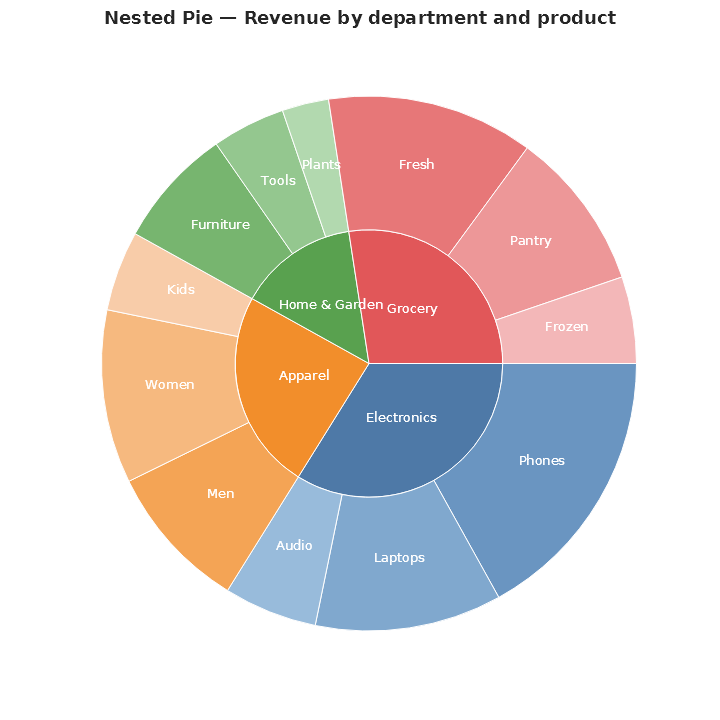
An inner disc shows the departments, and an outer ring breaks each department down by product. This is a thin alias for Sunburst:
Plt.Create()
    .WithTitle("Nested Pie — Revenue by department and product")
    .WithSize(720, 720)
    .AddSubPlot(1, 1, 1, ax => ax.NestedPie(departments))
    .Save("nested_pie.svg");
Treemap with expand/collapse
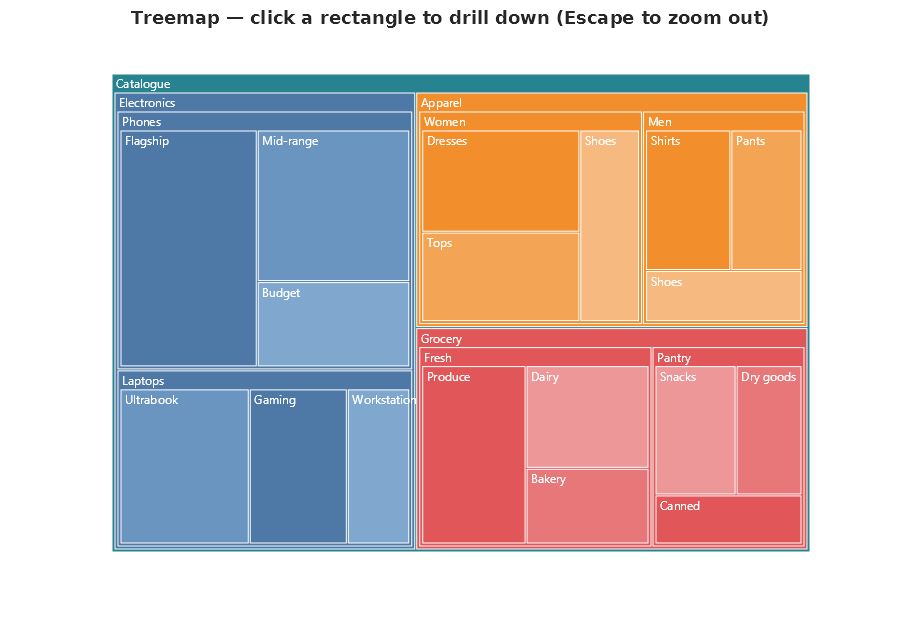
Each interior node renders as a coloured rectangle with a label header along the top. The children are squarified into the reduced bounds below that header, so the parent colour frames its descendants. This matches the d3 flare.json nested-treemap style. The initial interactive view is identical to the static SVG — every node at every depth is visible on first paint. This is called "steady pictures": the picture does not jump when you enter interactive mode. Click a parent rect to collapse its descendants and focus on the surrounding context; click it again to expand them. You can collapse several parents independently. Leaves are not clickable, so the cursor stays the default one when you hover over them.
Labels render at a single readable 12 pt size at every depth. Children paint over parents (Shneiderman z-order), so where rectangles overlap you read the deepest visible label, which is the most specific one, and nothing has to move to show it. For static SVG output with deep trees, call .WithAutoSize(root) on the FigureBuilder; it picks a canvas big enough to fit every label cleanly without overflow. In interactive output, the reader pans and zooms to read labels that overflow.
var catalogue = new TreeNode
{
    Label = "Revenue",
    Children =
    [
        new()
        {
            Label = "Electronics", Value = 42, Color = Colors.Blue,
            Children =
            [
                new()
                {
                    Label = "Phones", Value = 22, Color = Colors.CornflowerBlue,
                    Children =
                    [
                        new() { Label = "iPhone", Value = 12, Color = Colors.RoyalBlue },
                        new() { Label = "Galaxy", Value = 7,  Color = Colors.SteelBlue },
                        new() { Label = "Pixel",  Value = 3,  Color = Colors.CornflowerBlue },
                    ]
                },
                new() { Label = "Laptops", Value = 14, Color = Colors.SteelBlue },
                new() { Label = "TVs",     Value = 6,  Color = Colors.RoyalBlue },
            ]
        },
        new() { Label = "Apparel", Value = 28, Color = Colors.Orange,
            Children = [
                new() { Label = "Men's",   Value = 11, Color = Colors.Chocolate },
                new() { Label = "Women's", Value = 13, Color = Colors.Tomato },
                new() { Label = "Kids'",   Value = 4,  Color = Colors.Coral },
            ]
        },
        new() { Label = "Grocery", Value = 30, Color = Colors.Green,
            Children = [
                new() { Label = "Fresh",  Value = 13, Color = Colors.ForestGreen },
                new() { Label = "Frozen", Value = 9,  Color = Colors.Teal },
                new() { Label = "Pantry", Value = 8,  Color = Colors.Tab10Green },
            ]
        },
    ]
};

Plt.Create()
    .WithTitle("Treemap — every depth visible; click a parent to collapse its subtree, click again to restore")
    .WithAutoSize(catalogue)              // sizes the canvas to fit every label
    .WithTreemapDrilldown()
    .AddSubPlot(1, 1, 1, ax => ax.Treemap(catalogue, s => s.ShowLabels = true))
    .Save("treemap_drilldown.svg");
WithBrowserInteraction() also enables the same expand/collapse behaviour if you prefer the general-purpose fluent method.
A click is told apart from a drag. Hovering never suppresses the next click: only a pointer that moves while it is pressed starts a pan. And when the pan and zoom script has captured the pointer, the click handler finds the rectangle under the cursor with
document.elementFromPoint, so expanding and collapsing works in real browsers with pan and zoom switched on.