Accessibility
Install:
dotnet add package MatPlotLibNet
Color-blind safe palette
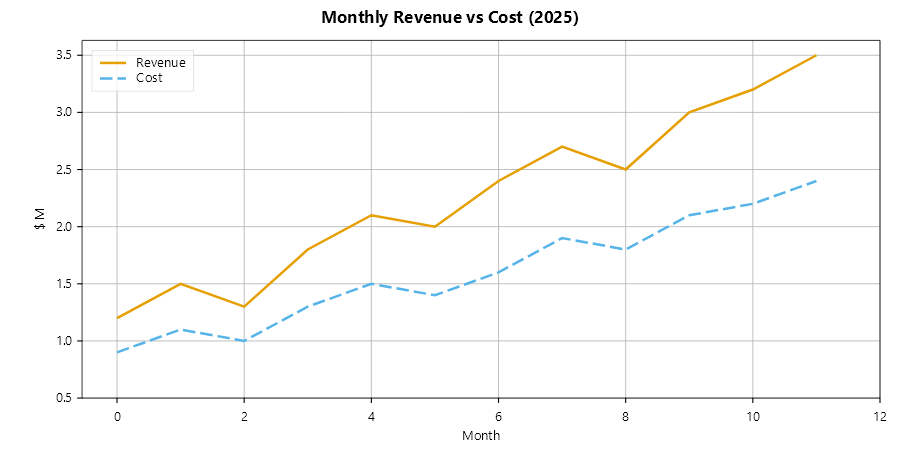
Theme.ColorBlindSafe uses the Okabe-Ito palette. Its colors stay distinguishable for people with all forms of
color vision deficiency:
Plt.Create()
    .WithTitle("Monthly Revenue vs Cost (2025)")
    .WithAltText("Line chart: revenue and cost trends over 12 months of 2025")
    .WithDescription("Revenue grew from $1.2M to $3.5M. Cost grew from $0.9M to $2.4M.")
    .WithTheme(Theme.ColorBlindSafe)
    .AddSubPlot(1, 1, 1, ax =>
    {
        ax.Plot(x, revenue, s => { s.Label = "Revenue"; s.LineWidth = 2.5; });
        ax.Plot(x, cost,    s => { s.Label = "Cost"; s.LineWidth = 2.5; s.LineStyle = LineStyle.Dashed; });
        ax.WithLegend(LegendPosition.UpperLeft);
    })
    .TightLayout()
    .Save("accessibility_colorblind.svg");
High-contrast theme
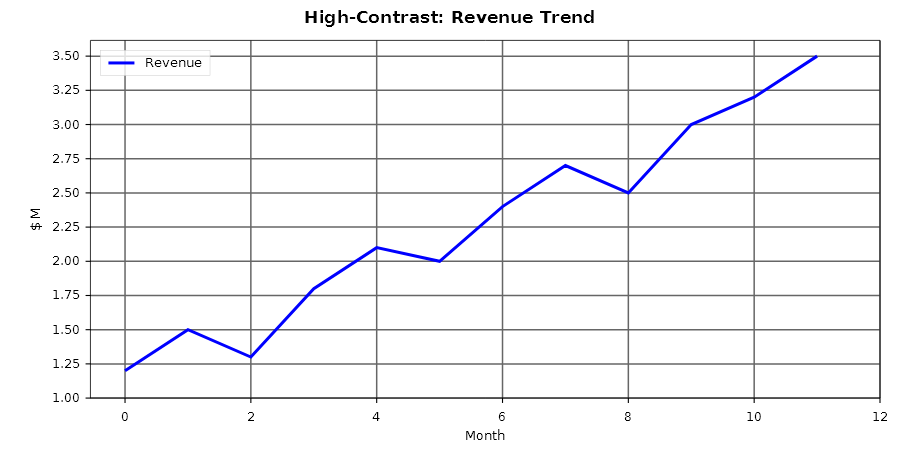
Theme.HighContrast meets WCAG AAA contrast ratios. It suits presentations and printed reports:
Plt.Create()
    .WithTitle("High-Contrast: Revenue Trend")
    .WithAltText("High-contrast line chart showing monthly revenue for 2025")
    .WithTheme(Theme.HighContrast)
    .AddSubPlot(1, 1, 1, ax =>
    {
        ax.Plot(x, revenue, s => { s.Label = "Revenue"; s.LineWidth = 3.0; });
        ax.WithLegend(LegendPosition.UpperLeft);
    })
    .TightLayout()
    .Save("high_contrast.svg");
SVG semantics
All SVG exports automatically include:
role="img"on the root<svg>element — orrole="group"when the figure contains a hyperlink<title>from.WithAltText(), else.WithTitle(), else the tile row's own labels, and<desc>from.WithDescription(), referenced byaria-labelledby/aria-describedbyaria-labelon the structural groups (axes, legend, series, selection rectangle)- Keyboard-navigable interactive features (pan, zoom, reset, brush-select, legend toggle)
Read the second and third bullets together, because they interact. The root role limits what the group
labels do. With role="img", a screen reader treats the whole SVG as one node. The WAI-ARIA
children-presentational rule removes every descendant, so the aria-label on a series group is never
announced. Those labels serve tooling, a hyperlinked figure (where the role is group and the labels are
reachable) and a future in which the figure is navigable. They do not serve today's screen-reader user. That
user hears only the <title> and the <desc>: one sentence about a picture that may hold four hundred
numbers.
That is why the next section exists. WCAG 1.1.1 calls a one-sentence summary a short text alternative. For a complex image such as a chart, the guideline also asks for a long text alternative: the data.
The data table
figure.ToDataTables() returns the figure's data as one ChartDataTable per group of series. Each table has a
caption, typed columns and rows of cells. Each table can write itself in three formats:
var figure = Plt.Create()
    .WithTitle("Monthly Revenue vs Cost (2025)")
    .WithAltText("Line chart: revenue and cost trends over 12 months of 2025")
    .AddSubPlot(1, 1, 1, ax =>
    {
        ax.SetXLabel("Month");
        ax.Plot(x, revenue, s => s.Label = "Revenue");
        ax.Plot(x, cost,    s => s.Label = "Cost");
    })
    .Build();

foreach (var table in figure.ToDataTables())
{
    string html     = table.ToHtml();      // <table> with <caption> and scoped <th>, capped at 1000 rows
    string markdown = table.ToMarkdown();  // for a README, a chat transcript, or a model
    string csv      = table.ToCsv();       // RFC 4180, CRLF, never capped — this one is a download
}
Both series are plotted against the same x values, so they form one table with three columns: Month,
Revenue and Cost. The reader does not have to align two tables by eye. Series that do not share an x each
get their own table. The x column takes the axis label when there is one, and prints dates when the axis is a
date axis.
The caption is figure.AccessibleName() (the alt text, else the title, else the tile labels) joined with the
subplot title and the series label. The table and the SVG <title> therefore always give the same figure the
same name.
What the table contains
The table holds the data, not what the renderer drew. A line with MaxDisplayPoints set draws a
downsampled path, and a streaming series draws only its viewport. Both tabulate every point they hold. The
table gives the reader everything the drawing shows, and more.
Each series type defines its own columns. An XY series gives x and y. An OHLC series gives date, open, high, low and close. A heatmap gives a long-form table with row, column and value columns, a row or column written as the name its axis shows there; it stays readable at any width, where a wide grid does not. A histogram gives its bins. A treemap gives its tree flattened depth-first, with the depth kept as a column.
Two of the 83 series types have no tabular form and produce no table: QuiverKeySeries (a reference arrow
that explains the scale of a vector field; it is an annotation, not a measurement) and Text3DSeries (text
placed at a point in a 3-D scene). They return null and are left out. A figure whose series are all of those
two types returns an empty list from ToDataTables(). ShowDataTable then renders no disclosure at all rather
than an empty one, so the reader is never offered a table that turns out to be empty.
A chart built in one call
Pareto, BumpChart, Ridgeline and the other verbs that build a chart in one call add ordinary series, so the
table, the legend and the SVG groups hold those series, and nothing more:
- The table names what the axis names. A lollipop, a dumbbell, a slope graph, a dot plot and parallel
coordinates stand on the centres of the slots their axis names, so each row of their table is keyed by that name,
under the axis title, or
categorywhen the axis has none. A Pareto chart is one table (category,Count,Cumulative %), and a dot plot is one table with a column per group, its categories from the top down. In parallel coordinates the break between two rows of one class is a row with an empty name. The names come from the axis, by the rule the picture writes them with: a line you put on the centres of named bars joins the bars' table, and a line that stands between the names keeps its numbers. - A named part is named everywhere. The bars and the cumulative line of a Pareto chart are two series groups
with "Count" and "Cumulative %" as their
aria-label, and the two columns of its table; a bump chart is one table with a column per group. The dots of a dumbbell, the lines of a bump chart or a slope graph and the layers of a stream graph are named the same way. - A ridge is named by its group. A ridgeline is one table with a column per group, named by the group (or by the
ridge's own label when you give it one), of the ridge's height above its baseline; the tallest ridge reaches 1. The
ridges carry no legend label, so their series groups have no
aria-label. - A part with no name has none. A lollipop's stems, a dumbbell's connector and the cells of a calendar heatmap carry no label, so they have no series group of their own and a plain column header.
- What the table cannot say. A calendar heatmap's table names the weekday of each cell (Mon … Sun) and numbers its week column from 0. It holds no dates: the chart is a heatmap of its cells and does not keep them. A Marimekko chart's table keeps the edges of its columns, which give each column's share of the total, and names its segments. It does not name the columns, whose names stand under their centres, where no point of the chart stands.
The tick labels themselves are inside the picture, which a screen reader announces by its alt text. Say what the
chart is in WithAltText and WithDescription.
A dashboard
A control-room dashboard is the hardest case to get right, and it is where a naive table is least useful. Three rules apply:
A tile tabulates all of its parts. StatTileSeries tables as label · value · target · caption · trend.
A tile exists to show a value next to its target and its trend, so the table carries those too, not the number
alone. A part the tile does not have is an empty cell, not a zero.
A row of tiles is one table. Every tile sits in its own subplot, but that is layout, not data. Neighbouring subplots that each produce the same single row are merged into one table with a row per tile. The reader gets the row the operator sees, not five one-row grids to join by hand.
A position on a date axis prints as a time. A state timeline's start and end are x coordinates, and
Plt.OpsDashboard() pins a date axis on the shared window. The table therefore prints 2026-09-12 07:58:20,
not 46277.332. A cell keeps the precision it was given: a midnight prints as a date, a whole minute prints to
the minute, and a thirty-second sample prints to the second. The last case matters more than it seems: rounding
to the minute would make two consecutive samples identical.
// The dashboard the cookbook builds above, read rather than seen:
foreach (var table in dashboard.ToDataTables())
{
    Console.WriteLine(table.ToMarkdown());
}

// **Order service — gateway**
// | label   | value | target | caption            | trend                  |
// | ---     | ---   | ---    | ---                | ---                    |
// | Buses   | 15    |        | all 15 normal      |                        |
// | RFx p99 | 28.1  | 25     | target 25 ms · +3.1| 24.1, 24.8, 25.3, 26…  |
//
// **Order service — gateway — Exchange feed**
// | state    | start               | end                 |
// | ---      | ---                 | ---                 |
// | normal   | 2026-09-12 07:55    | 2026-09-12 07:57    |
// | degraded | 2026-09-12 07:57    | 2026-09-12 07:58:20 |
Putting it on the page
| Host | How |
|---|---|
| Blazor | <MplChart Figure="fig" ShowDataTable="true" /> renders a <details> disclosure after the chart, in every display mode |
| ASP.NET Core | app.MapChartTableEndpoint("/chart/table", ctx => figure) beside MapChartSvgEndpoint; returns an HTML fragment as text/html; charset=utf-8 |
| GraphQL | the chartDataTable(chartId: …) field beside chartSvg |
| MCP | the chart_data_table tool; it returns markdown, so a model can read the values from a chart it can otherwise only see |
| Anything else | table.ToHtml() into your own page, table.ToCsv() behind a download link |
Put the table in a disclosure (<details>/<summary>) immediately after the chart. That is the placement the
WCAG technique for complex images names. The table then sits in the reading order at the point where the reader
needs it, and a sighted reader sees only one closed line. That is what ShowDataTable renders. It defaults to
false because the layout of the page is yours, not the library's. There is no accessibility reason to leave
it off.
@* The table is not a fallback for a broken image. It is the same information, in a form that survives
   a screen reader, a text browser, a copy-paste into a spreadsheet and a printout. *@
<MplChart Figure="@_figure" ShowDataTable="true" />
Where it stops
HTML and markdown cap at 1000 rows and end with a "… N more rows" line. A table nobody can page through is not
a usable alternative either, and a 50,000-row <table> is a page that never finishes laying out. ToCsv()
never caps: a download has no reading order to protect, and a truncated file loses data without anyone
noticing. When the cap applies, offer the CSV.
Never encode meaning in colour alone
Roughly eight percent of men have a red-green colour deficiency. A chart that says only "red is bad, green is fine" has not communicated with them at all. On a monitoring wall, where a glance has to be enough, that is not a cosmetic failure.
The library has two mechanisms for exactly this. Both are worth using outside a dashboard too.
A hatch pattern carries meaning that colour alone cannot. HatchPattern on ShapeStyle, and therefore on
BarSeries, AreaSeries, HistogramSeries, StackedAreaSeries, PieSeries, StatTileSeries and
StateSegment, paints a pattern over a fill. The pattern stays visible in greyscale print, for a colour-blind
reader and on a bad projector, where colour alone does not.
// "No contact" is hatched, not coloured: the source is silent, not broken — a different fault, and a
// dashboard that paints them the same lies exactly when it matters.
ax.StatTile(0, t =>
{
    t.Label = "Exchange";
    t.Caption = "no contact";
    t.Hatch = HatchPattern.ForwardDiagonal;
});
Saying it as a condition rather than as a pattern gets the same mark with the reasoning attached, and keeps the two cases apart — a reading nobody can see and a reading somebody silenced wear different patterns, never the same one:
ax.StatTile(0, t =>
{
    t.Label = "Exchange";
    t.Caption = "no contact";
    t.Condition = OpsCondition.Unknown;                       // hatched: we cannot see it
});

ax.StatTile(412, t =>
{
    t.Label = "RFx p99";
    t.Caption = "muted by the night shift";
    t.Condition = new OpsCondition(OpsSeverity.Critical).Shelve();   // its own pattern: muted, still critical
});
The SVG backend and the raster (Skia PNG/PDF) backends paint the same pattern. Where a backend cannot paint a
hatch (the MAUI canvas has no hatch primitive), it reports the omission on ChartDiagnostics instead of
dropping the hatch silently. You can then see that an export lost a mark, instead of discovering it later.
The alarm palette is colour-blind safe by construction. Theme.Alarm (AlarmPalette) names Okabe-Ito
amber for attention and vermillion for critical. The two stay distinguishable under every common form of
colour-vision deficiency. It also names the neutral shade for a resting state. The strongest accessibility
measure of all is to spend no colour on states that do not need it: when the normal state is uncoloured, the
abnormal one does not have to compete for attention.
A coloured axis keeps its title, and a line keeps its name
SetYAxisColor colours an axis like the line it measures (see
Direct labels and axis colours). That colour is a second cue, never the only
one. Give both Y axes a title that names the quantity and its unit, and name each line, either in the legend or
at the end of the line with WithDirectLabel(). A reader who cannot tell the two colours apart can still see which
line belongs to which axis:
ax.Plot(hours, temperature, s => { s.Label = "Temperature"; s.Color = warm; })
  .WithDirectLabel()
  .SetYLabel("Temperature (°C)")              // the title says in words what the colour says
  .SetYAxisColor(warm)
  .WithSecondaryYAxis(right => right
      .Plot(hours, humidity, s => { s.Label = "Humidity"; s.Color = cool; })
      .WithDirectLabel()
      .SetYLabel("Relative humidity (%)")
      .SetYAxisColor(cool));
A name drawn at the end of a line is more than pixels. Every labelled series is drawn in a group of its own that carries the name, and the end label is drawn inside that group. This is the SVG of the right-hand line above:
<g class="series" aria-label="Humidity">
  <polyline points="…" … />
  <text x="709.5" y="116.53" … text-anchor="start" fill="#1F77B4">Humidity</text>
</g>
With WithBrowserInteraction() the same group also carries data-series-index="1": the index the legend toggle,
the hover highlight and the keyboard focus use. The label therefore hides and highlights together with its line,
on the right-hand axis just as on the left. When the MatPlotLibNet.Skia package is loaded, text is drawn as glyph
outlines (<path>) instead of <text>, and the name stays in the group's aria-label.
As the SVG semantics section explains, a screen reader does not announce those group labels while
the root is role="img". For that reader, the data table names both lines in its column
headers: for the chart above, Hour of the day, Temperature and Humidity, in one table.
Motion
If a display uses motion to carry meaning, use it for exactly one thing, and use it rarely. The alarm convention reserves a slow pulse (roughly 1 Hz) for a single meaning: this is new and nobody has acknowledged it yet. Once acknowledged, the alarm stops pulsing and stays coloured while the problem lasts.
Constant flickering usually does not mean the system has that many problems; it means nobody has acknowledged
the existing alarms in a while. Within a week, viewers stop noticing an animation that runs all the time, and
that is a worse outcome than never having animated at all. Where a page animates,
honour prefers-reduced-motion.