Direct labels and axis colours
Install:
dotnet add package MatPlotLibNet
A legend makes the reader look away from the data to find out which line is which, and then look back. With a few lines, the name can stand where the line ends instead. A chart with two Y axes raises a second question: which axis does each line belong to? Colouring each axis like its line answers that at a glance, and the axis title still says it in words.
Name a line at its end
WithDirectLabel() draws the name of the series added last at the end of its line:
using MatPlotLibNet;

double[] months = [1, 2, 3, 4, 5, 6, 7, 8, 9, 10, 11, 12];
double[] web    = [42, 45, 47, 50, 53, 55, 54, 57, 59, 60, 62, 61];
double[] app    = [12, 15, 19, 22, 27, 31, 36, 40, 45, 49, 54, 58];
double[] store  = [30, 29, 31, 30, 28, 27, 29, 28, 26, 27, 25, 24];

Plt.Create()
    .WithTitle("Visitors per month")
    .WithSize(800, 450)
    .AddSubPlot(1, 1, 1, ax => ax
        .Plot(months, web, s => s.Label = "Web").WithDirectLabel()
        .Plot(months, app, s => s.Label = "App").WithDirectLabel()
        .Plot(months, store, s => s.Label = "Store").WithDirectLabel()
        .SetXLabel("Month")
        .SetYLabel("Visitors (thousands)"))
    .Save("direct_labels.svg");
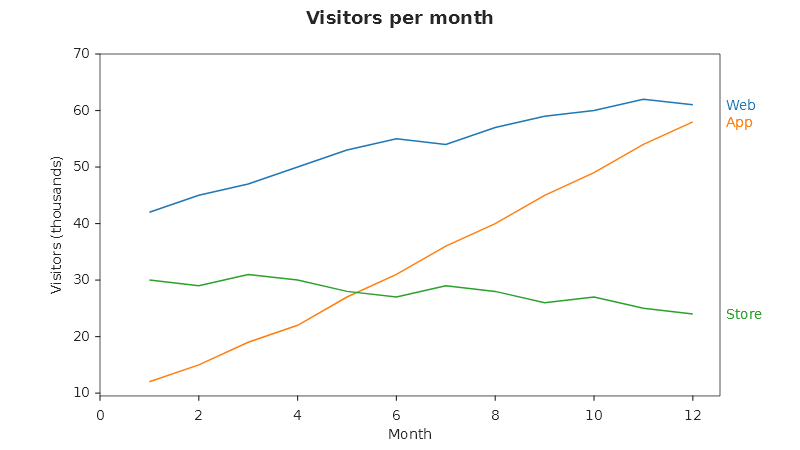
What you get:
- The name stands right of the plot area, at the height where the line ends, in the colour of the line and in the legend's font.
- The end of a line is its last point whose x and y are both numbers and whose x lies inside the visible X
range. A trailing
NaNis skipped, and so is a point cut off bySetXLim. A line with no such point gets no label. - Labels that would overlap are pushed apart by one label height and keep their order. In the chart above, "Web" (61) and "App" (58) end close together and are drawn one above the other.
- The figure reserves room on the right for the widest label, with or without
TightLayout(). - A line named at its end leaves the legend. When every labelled series is named at its end, no legend is drawn; any other labelled series stay in the legend as before.
- With
WithLegendValues(), the label carries the last value too, the way the legend would:Web = 61.00. - A hidden series (
Visible = false, or switched off with the legend toggle) draws no label.
WithDirectLabel() is a shorthand. The same setting is a property on the series:
using MatPlotLibNet.Models.Series;

ax.Plot(months, web, s =>
{
    s.Label = "Web";
    s.LabelPlacement = SeriesLabelPlacement.LineEnd;   // the same as .WithDirectLabel()
});
SeriesLabelPlacement.Legend is the default. A line series and a streaming line series can carry the setting
(both implement IHasLabelPlacement). After any other series, such as a scatter or a bar series,
WithDirectLabel() changes nothing.
Colour an axis like its line
SetYAxisColor(color) colours the left Y axis in one call: its spine, its tick marks, its tick labels and its
title. Everything else the axis carries (tick length, label rotation, font size, spine width) is kept. The
other three axes have the same verb:
| Axis | Call |
|---|---|
| Left Y | ax.SetYAxisColor(color) |
| Right Y | ax.WithSecondaryYAxis(right => right.SetYAxisColor(color)) |
| Bottom X | ax.SetXAxisColor(color) |
| Top X | ax.WithSecondaryXAxis(top => top.SetXAxisColor(color)) |
Both together: a dual axis that needs no legend
using MatPlotLibNet;
using MatPlotLibNet.Styling;

double[] hours       = [0, 2, 4, 6, 8, 10, 12, 14, 16, 18, 20, 22, 24];
double[] temperature = [14.2, 13.5, 13.1, 14.0, 17.5, 21.8, 25.4, 27.1, 26.3, 22.9, 19.0, 16.4, 15.0];
double[] humidity    = [88, 90, 91, 89, 78, 64, 52, 46, 49, 60, 72, 81, 85];

var warm = Colors.Tab10Orange;
var cool = Colors.Tab10Blue;

Plt.Create()
    .WithTitle("Greenhouse, one day")
    .WithSize(800, 450)
    .AddSubPlot(1, 1, 1, ax => ax
        .Plot(hours, temperature, s => { s.Label = "Temperature"; s.Color = warm; })
        .WithDirectLabel()
        .SetXLabel("Hour of the day")
        .SetYLabel("Temperature (°C)")
        .SetYAxisColor(warm)
        .WithSecondaryYAxis(right => right
            .Plot(hours, humidity, s => { s.Label = "Humidity"; s.Color = cool; })
            .WithDirectLabel()
            .SetYLabel("Relative humidity (%)")
            .SetYAxisColor(cool)))
    .Save("direct_labels_dual_axis.svg");
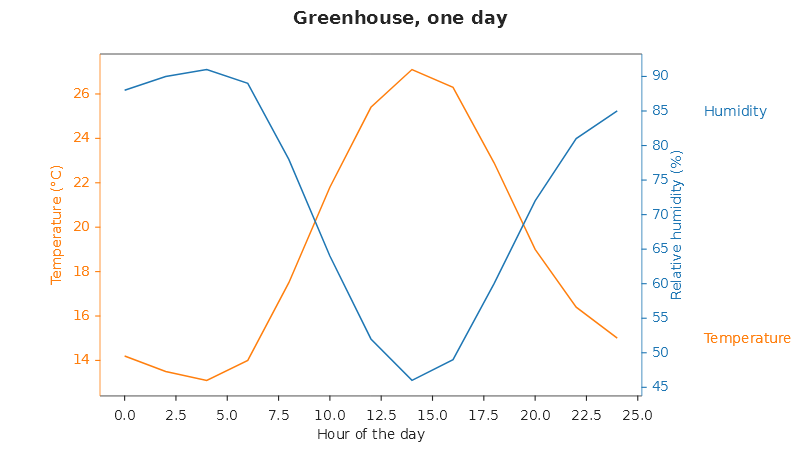
The end labels stand past the right-hand axis's tick labels and title, so the labels of the secondary line never cover its own axis. Each label is drawn inside the group of its series, so the interactive legend toggle, the hover highlight and a streaming update treat the label as part of the line, on either axis.
Colour is a second cue here, never the only one: each axis title names its quantity and its unit, and each line carries its name. In greyscale print, or for a reader who cannot tell orange from blue, the chart still reads. The accessibility page has the rule in full.
Orange and blue are a pair that stays apart under the common forms of colour-vision deficiency. Two reds, or a red and a green, are not.
A live chart
A streaming line takes the same setting. Its label follows the newest point as data arrives:
using MatPlotLibNet;
using MatPlotLibNet.Models.Series;
using MatPlotLibNet.Models.Series.Streaming;
using MatPlotLibNet.Styling;

StreamingLineSeries? delivered = null;
StreamingLineSeries? traffic   = null;

var sf = Plt.Create()
    .WithTitle("Ops performance")
    .AddSubPlot(1, 1, 1, ax =>
    {
        delivered = ax.StreamingPlot(600, s =>
        {
            s.Label = "Delivered";
            s.Color = Colors.Tab10Blue;
            s.LabelPlacement = SeriesLabelPlacement.LineEnd;
        });
        ax.SetYLabel("messages / sec")
          .SetYAxisColor(Colors.Tab10Blue)
          .WithSecondaryYAxis(right =>
          {
              traffic = right.StreamingPlot(600, s =>
              {
                  s.Label = "Traffic";
                  s.Color = Colors.Tab10Orange;
                  s.LabelPlacement = SeriesLabelPlacement.LineEnd;
              });
              right.SetYLabel("kB / sec").SetYAxisColor(Colors.Tab10Orange);
          });
    })
    .BuildStreaming(TimeSpan.FromSeconds(1));

delivered!.AppendPoint(1, 420);
traffic!.AppendPoint(1, 96);
Saving to JSON
Both settings survive ToJson() and ChartSerializerDefault.Current.FromJson(). The placement is written beside the
label, and only when it is not the default:
{
  "label": "Humidity",
  "labelPlacement": "lineend",
  "color": "#1F77B4"
}
An axis colour is written as the axis's tickColor, tickLabelColor and labelColor, plus the colour of its
spine. The figure above renders to the same SVG before and after the round trip. JSON written before these
settings existed reads as a legend entry and an uncoloured axis. The MCP server's chart spec takes the same
labelPlacement field on a series.
A streaming series is not restored by FromJson at all; that is true of every streaming series, with or without
a label placement.
Where end labels are not drawn
A name is never lost. Where an end label cannot be drawn, the series keeps its legend entry instead:
- Polar and 3D axes have no right-hand column to put a label in. A series marked
LineEndstays in the legend. - Insets have no right margin of their own, and a label there would cover the parent plot's data. The series stays in the inset's legend.
- The top X axis. End labels are drawn for lines on the left and the right Y axis.
WithSecondaryXAxishas noWithDirectLabel(). - Other series types. Only line and streaming line series carry a placement. Name a scatter, a bar or an area
series in the legend, or with
Annotate.
Axis colours apply to the four axes of a Cartesian plot.